
Missing the Blue Screen on Windows 7? Don’t worry – there’s hope!

Speed Up My PC

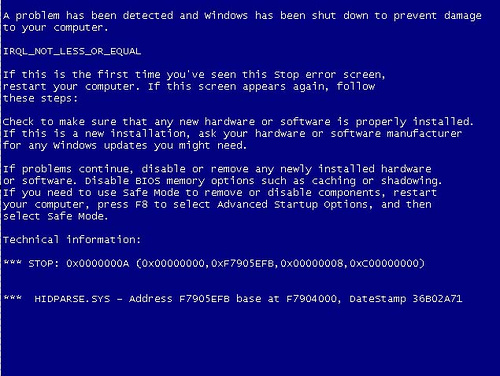
Missing the Blue Screen on Windows 7? Don’t worry – there’s hope still! With the advent of Windows 7 Blue Screen of Death (BSODs) or Stop Errors are almost extinct and a great way to remind yourself of what a blue screen looks like or to fool your office workers and friends, run the Blue Screen screen saver from Sysinternals.
na Missing the Blue Screen on Windows 7? Don’t worry – there’s hope!

The screen saver simulates authentic looking blue screens that reflect the version of Windows on which you run it, generating all blue screen text using actual system information such as the list of loaded drivers. It also mimics an automatic reboot, complete with the Windows startup splash screen. Note that unlike other screen savers, where a mouse movement dismisses them, the Blue Screen screen saver requires a key press.

Using the following syntax for the Psexec tool from Sysinternals, you can even run the screen saver on another system:

psexec \\computername –i –d “c:\sysinternalsbluescreen.scr” –s

The command requires that you have administrative privilege on the remote system. (You can use the –u and –p Psexec switches to specify alternate credentials).

Now its time to do some serious pranks. Enjoy! smile Missing the Blue Screen on Windows 7? Don’t worry – there’s hope!

Download: Blue Screen Screensaver | Psexec tool.

Some virus scanners flag the Bluescreen screen saver as a virus. If this is the case with your virus scanner, you may not be able to use this screen saver. But hey, this screen saver is from Microsoft SysInternals and it can’t be a virus now, eh…Can it?

And sigh … if you are one of those “lucky” one’s to get a Blue Screen in Windows 7, you might want to see this Blue Screen Help Guide!

Posted by on , in Category Downloads with Tags
Nitin Agarwal is a Microsoft MVP and a Pro Blogger. He has been awarded as Most Valuable Professional for three times by Microsoft in Windows Expert - Consumer category. He is immensely inspired by Bill Gates, Steve Jobs and APJ Abdul Kalam.
  • trm96

    “Missing the Blue Screen”!? WTH are you talking about!?

  • http://www.thewindowsclub.com/ Windows Club

    ^ The post and the title is in humor! :)

  • trm96

    I know, I know. I guess I just forgot the “lol”. lol :)

  • bonbonboi

    there is should be no reason to an OS to stop working because of a hardware driver or a bad program… then if so happened why to call it an OS. which should the OS control everything as a police man.. should guide the drivers and the programs. but they cannot kill it or stop it…

  • Josh

    The commands given aren’t working for me. Even with supplying domain administrator credentials. It says that it started with process id 1760, but nothing ever happens.

  • Eric W

    @trm96 – I’d rather know WTH bonbonboi is talking about. there is should be no reason (sic) that my brain hurts so much when I read a post.
    then if so happened why to call it (sic) a brain?

  • Florin

    I get the Blue Screen on Windows 7 about 1 time per month :(

  • http://www.thewindowsclub.com Anand Khanse

    You might want to get help at our forums: http://forum.thewindowsclub.com/ :)

  • Robed

    The blue screen flashes so fast I can not possibly read what it says
    Is there a way to pause it?

  • http://www.facebook.com/serveurprivewow Marc Malka

    Last time I saw a BSOD, 5 years ago. I run PC 24/24 restart every 1 to 3 months. Grow up childs, don’t get killed by stupid downloads.