
WinOMeter is a small freeware utility that measures your Windows computer’s activity. There are a lot of things you can do with it in order to measure your Windows computer’s activity.
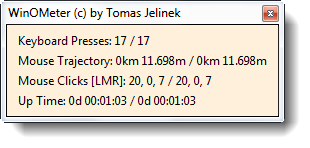
Count Keyboard presses, Mouse clicks, etc
To begin with, it can count the keyboard and mouse presses & can also even calculate the trajectory that you have arrived at using your mouse. You can easily set it up to be automatically loaded on startup if you would like to have captured all your activity. There is a setting that lets you do so easily.
If you want to measure your computer up-time, this small freeware will also let you do it. Every day, the activity will be saved in its History, so that you can create statistics of your activity, and find out where exactly you are spending your time.
If you need to save your activity statistics, you can also export your whole history to a CSV file or comma-separated values file, which may be opened by Microsoft Office Excel or similar software. To export it, right-click menu or directly from the command line; e.g. winometer.exe /exporthistory history.csv.
If you want to keep a track of what you do and how you do it, you definitely want to check out this free software,
WinOMeter software free download
Visit WinOMeter Download Page to read more about it and to download it.
TIP: Go here you are looking for a mouse distance tracker software for Windows PC.

