
If you want to know the exact size and position of any element on your Windows desktop then you can use one of these free screen ruler software on your Windows 10/8/7 PC.
Pixel Ruler software for Windows 10
1] Simple Screen Ruler

Simple Screen Ruler is a UWP app that displays a ruler on the screen. You can measure the objects by showed ruler on the screen. You can also measure the picture’s size by the showed ruler on the screen.
Download it from the Microsoft Store.
2] Pixel Ruler

Pixel Ruler is a Free Virtual Screen ruler which features horizontal and vertical orientation, dynamic mouse measurement tracking in pixels, cool design. Its features include:
- Free and easy to use virtual screen ruler
- Float over your screen
- Work with all applications
- Show measurements in Pixels ;
- Rotate to horizontal or vertical position
- Maximum of 1300 pixels
- Choose between several skins.
You won’t find an option to uninstall Pixel Ruler in Uninstall Programs. Type Pixel Reader in start search and click on Uninstall to uninstall it. If it doesn’t work, copy-paste the following in Run box and hit Enter. This will uninstall it.
C:\Users\(username)\AppData\Local\Mioplanet\PixelRuler\PixelRuler.exe "C:\Users\(username)ACK\AppData\Local//Mioplanet\PixelRuler\__maintenance.mio" "(>MAINTENANCE)"
Download it here.
3] Screen Ruler
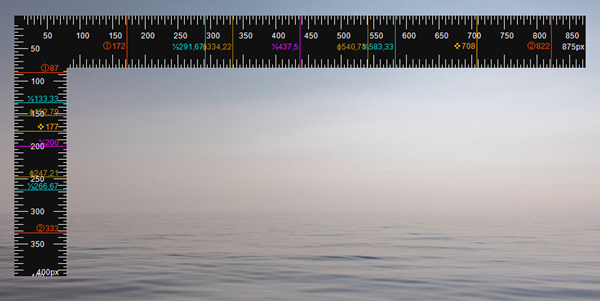
Screen Ruler is a lightweight and configurable ruler tool for Windows Desktop which allows you to measure the size of elements on the screen in different units, including pixels, centimeters and inches. This is possible either using a two-dimensional, rectangular ruler scale or a one-dimensional, horizontal or vertical scale.
The ruler can be moved and resized precisely using either the mouse or the keyboard and custom marking lines can be added. Besides coming with a light and a dark theme, Screen Ruler also allows you to fully customize its appearance by changing all color settings.
We hope you find these tools useful.

