
The blinking cursor appears in the text field where we can type something. By default, this cursor blinks at a particular speed on Windows 11/10. Maybe you think your mouse cursor blinks too slow for your liking or maybe you just want it to blink faster. In Windows 11/10, you can make the cursor blink faster or slower, as required, using Keyboard Properties or Registry Editor.
Make the cursor blink faster or slower in Windows 11/10
We will show you the following two methods to make the cursor blink faster or slower in Windows 11/10.
- Via the Control Panel
- Via the Registry Editor
Below, we have explained both of these methods in detail.
1] The Control Panel
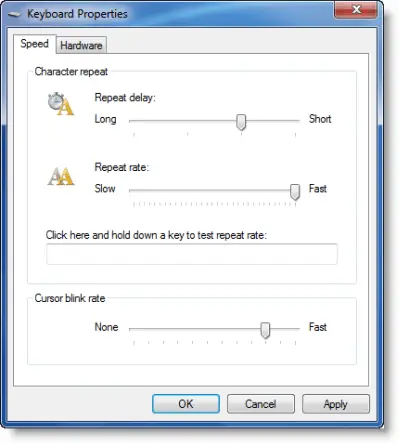
To make the cursor blink faster or slower in Windows 11/10 via the Control Panel follow the steps provided below:
- Open the Control Panel.
- Change the View by mode to Large icons.
- Click Keyboard.
- Under the Cursor blink rate section, move the slider towards the left to slow down the cursor blink speed and towards the right to make the cursor blink faster.
- Click Apply and then click OK to save the changes.
2] The Registry Editor
The next method to change the cursor blinking speed on Windows 11/10 is to use the Registry Editor. This method requires the Registry modification. Therefore, follow all the steps provided here carefully, as incorrect modifications in the Windows Registry can make your system unstable.
Before you proceed, we recommend you create a System Restore Point and backup your Registry. This will allow you to restore your system to the previous working state if any problem occurs. Do note that if you restore your system to a particular point in time, all the changes you have made to your system after that point in time will also be reverted.
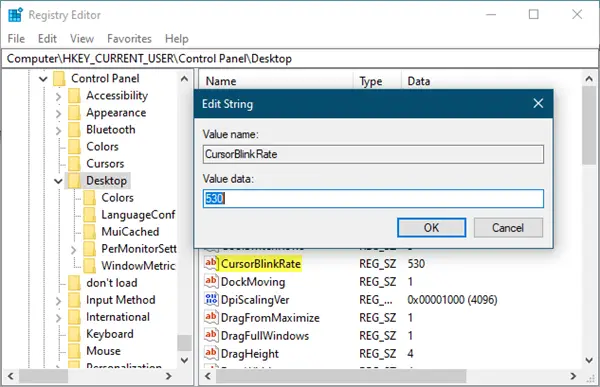
Open Registry Editor and navigate to the following path:
HKEY_CURRENT_USER\Control Panel\Desktop
For the easiest navigation, copy the above path, paste it into the address bar of the Registry Editor, and hit Enter. Make sure that you have selected the Desktop folder on the left side.
Now, look for the CursorBlinkRate String on the right side. Once you find it, double-click on it and change its value from the default 530 to any figure between 200 and 1200. 200 makes it blink faster and 1200 will make it blink slower.
That’s it. I hope this helps.
What does cursor blink rate do?
The cursor blink rate defines the speed of the blinking cursor. Windows 11/10 allows you to change the cursor blinking rate and make the cursor blink faster and slower as per your requirements. You can do so via the Control Panel and the Registry Editor.
How do I fix my cursor speed?
You can change the mouse cursor blinking speed and mouse pointer moving speed in Windows 11/10 via the Control Panel. Open the Control Panel and type mouse in the Control Panel search bar. Now, select Mouse from the search results. Under the Pointer Options tab, you can set the mouse pointer moving speed by moving the slider.
Learn how to Change Windows Cursor Thickness & Blinking Rate to make it more visible.
These may also interest you:

