
If you want to find out if any of your Windows Live Messenger contacts or friends have deleted or blocked or removed your name, from their contacts list, here are ways to do so.
Who deleted you in Messenger
Open Windows Live Messenger > Menu Bar > Tools > Options > Privacy > LHS Box Allow List > Right Click on the persons name.
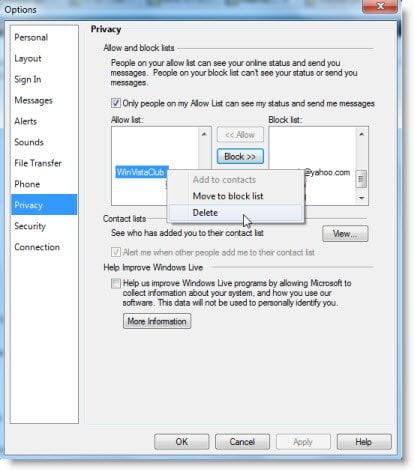
Now here, if you see that the Delete Menu is ACTIVE, then it would mean that the person has deleted you !
Additionally, Open Tools > Options > Privacy > View
Here you can see the List of those who still you in their List Of Contacts.
Please stay from all such websites who claim to offer such or similar services and require you to give away your messenger username/passwords.

