
New Windows users have a very common question – Why does the UAC Prompt make screen dark when it appears? The answer was, of course, the newly introduced Secure Desktop feature – which continues in Windows 11, Windows 10, Windows 8, and Windows 7. While you should not, if for some reason you wish to now turn off or disable Secure Desktop, you will need to use the Registry or Group Policy.
How to disable Secure Desktop in Windows 11/10
Let us see how to turn off or disable Dimmed Secure Desktop for UAC Prompt in Windows 11/10 using Group Policy Editor or Registry.
Turn off Secure Desktop using Registry Editor
If you are a version of Windows that does not have the Group Policy Editor, then you can disable it using the Registry Editor.
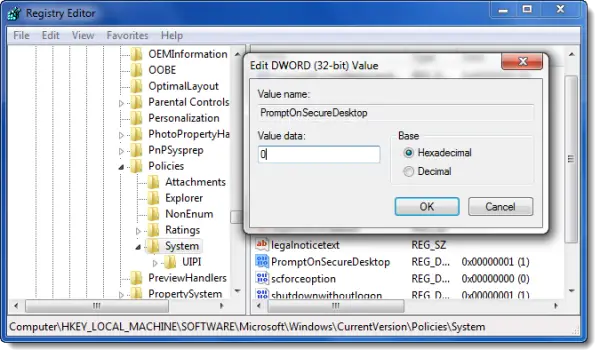
To do so:
Type regedit in start search and hit Enter to open the Registry Editor and navigate to the following key:
HKEY_LOCAL_MACHINE\SOFTWARE\Microsoft\Windows\CurrentVersion\Policies\System
Now in the right pane, double click the PromptOnSecureDesktop registry entry, and then change its value from 1 to 0.
Click OK > Exit.
Read: How to Change, Enable, Disable User Account Control (UAC) settings in Windows.
Turn On or Off Dimmed Secure Desktop for UAC Prompt using Group Policy Editor
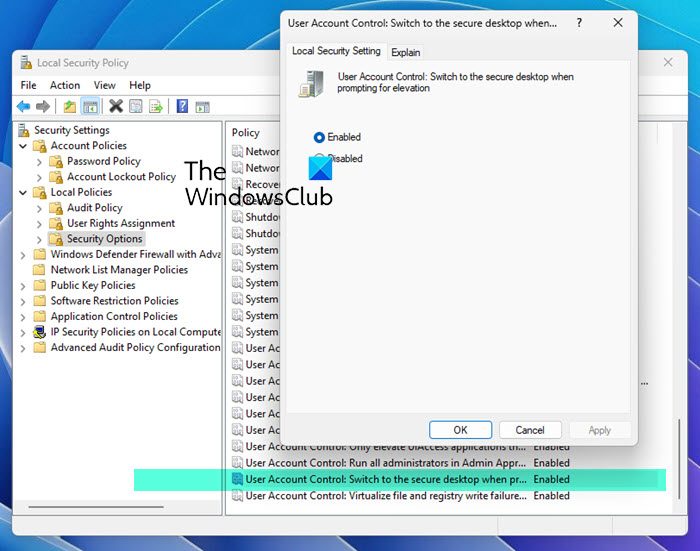
If you are using a Windows edition that ships with the Group Policy Editor, then you can Run secpol.msc to open the Local Security Policy. It goes without saying that you have to be an Administrator to do this.
On the left side, expand Local Policies > Security Options.
Next on the right side scroll download to the second last option, which says “User Account Control: Switch to the secure desktop when prompting for elevation”.
Double-click to make a dialog box appear. here you will see two options. The options are:
- Enabled: All elevation requests by default will go to the secure desktop. Default.
- Disabled: All elevation requests will go to the interactive users desktop
Disable the feature if you wish.
By disabling Secure Desktop, you would be opening your computer to possible security risks & threats, and hence is not advisable.

