
A small tip on how to run your command prompt as an administrator or in other words, open an elevated command prompt, in Windows 11/10/8/7. We have seen how to launch Command Prompt, and carry out many tasks. But some tasks required elevated privileges to be run. In such cases, you have to open an elevated command prompt window. So let us see how to launch, run or open Command Prompt as an administrator or an elevated CMD with administrative privileges & rights in Windows 11/10/8/7.
How to run Command Prompt as Administrator in Windows 11/10
To run Command Prompt as administrator in Windows 11/10, follow these steps:
- Search for cmd in the Taskbar search box.
- Make sure the Command Prompt result is selected.
- Click on the Run as administrator option.
- Click the Yes button in the UAC prompt.
To learn more about these steps, continue reading.
At first, you need to search for cmd in the Taskbar search box and ensure that the Command Prompt result is selected or highlighted.
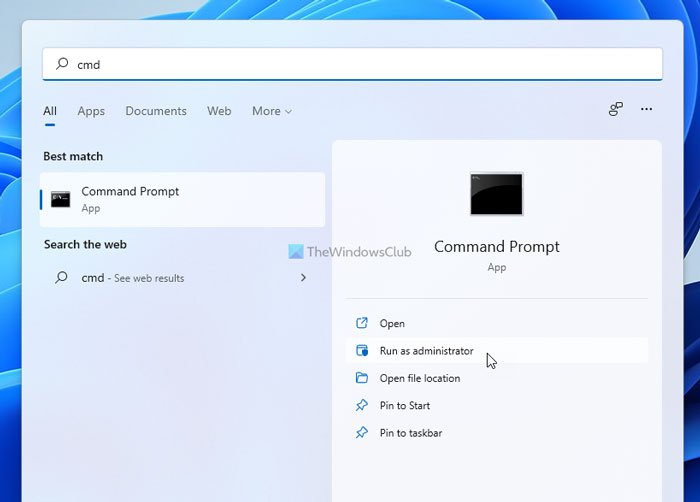
If so, click the Run as administrator option. If your computer displays the UAC prompt, click the Yes option to find Command Prompt as administrator.
However, if you are using Windows 10 or Windows 8, you may not have to follow this aforementioned method. In Windows 10/8, you can open elevated Command Prompt from the Win+X menu.
In Windows 10 and Windows 8, follow these steps:
Take the cursor to the bottom left corner and right-click to open the WinX menu. Select Command Prompt (Admin) to open an elevated command prompt.
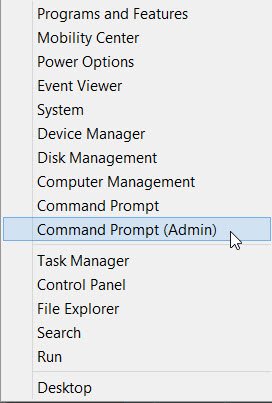
So you see, things have been made easier in Windows 10/8.1.
In Windows 7, follow these steps:
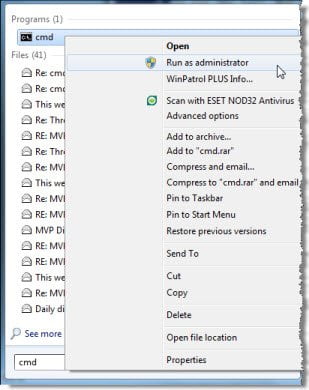
- Type cmd in Start search.
- In the results, you will see ‘cmd‘.
- Right-click on it and from the context menu select Run as Administrator.
TIP: This post will help you if you can’t run Command Prompt as administrator.
Open Elevated Command Prompt using the System32 folder
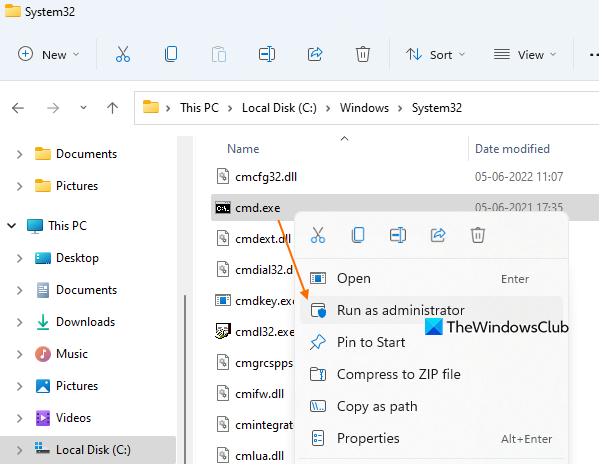
The System32 folder contains the storage location of the Windows Command Processor (cmd.exe) application. You can access that location and then open an elevated Command Prompt window. Here are the steps:
- Press Win+E hotkey to open the File Explorer
- Go to C:\Windows\System32
- Under the System32 folder, look for the cmd.exe file
- Right-click on the cmd.exe file
- Click on the Run as administrator option.
In the UAC prompt, you need to use the Yes button, and then an elevated Command Prompt window will be in front of you.
Run Command Prompt as an administrator using the Run Command box
You can also use the Run Command box to open Command Prompt window as an administrator on your Windows 11/10 computer. For this, the steps are as follows:
- Use Win+R hotkey. This will open the Run Command box
- Type cmd or cmd.exe in the text field
- Press Ctrl+Shift+Enter hotkey.
If a UAC prompt appears, press the Yes button, and the Command Prompt window will open as an administrator.
Open Command Prompt as an administrator using PowerShell
Windows PowerShell can also help you open a Command Prompt window as an administrator on a Windows 11/10 PC. The steps are mentioned below:
- Open Windows PowerShell using the Search box or another way you like
- In the PowerShell window, enter and execute the following command:
start-process cmd -verb runas
This will open the UAC prompt box in which you can click on the Yes button. Finally, an elevated Command Prompt window will be there.
Other ways to open an elevated command prompt:
There are more other ways to open an elevated Command Prompt in Windows 11/10. Some of the ways are:
- Press Ctrl+Shift+Esc to open the Task Manager. Click on File menu > Run new task. To open a command prompt window, type cmd. Remember to check the Create this task with administrative privileges check-box. Then hit Enter.
- You can also open an elevated Command Prompt from the Task Manager using CTRL key.
- Or then simply open the Start Menu or Start Screen and start typing the command line. Next, hold the Shift and Ctrl keys, and then hit Enter to open the command line in an elevated command prompt.
- Open an elevated command prompt using CMD
- Run Commands from Windows Start Search Box as an Administrator
- How to always run Command Prompt as Administrator
- Run commands from Explorer address bar.
How do I get Command Prompt in Windows 11/10 as administrator?
There are a lot of ways using which you can open Command Prompt as an administrator in Windows 10 as well as Windows 11 OS. You can use the Search box, Win+X menu, Windows PowerShell, Run Command box, and other options to open an elevated Command Prompt. All such options are covered in this post above. Check them.
How do I force Command Prompt to run as administrator?
You can use the keyboard shortcut to force Command Prompt to run as administrator. For that, you need to search for cmd in the Taskbar search box and press the Ctrl+Shit+Enter button together.
How do I open Command Prompt in Windows 11?
Although Microsoft removed Command Prompt from the Win+X menu in Windows 11, you can use the Taskbar search box to open Command Prompt on your computer. You need to search fox cmd and hit the Enter button. It will open Command Prompt on your PC. Alternatively, you can open Windows Terminal to perform the same job.
How do I run cmd as administrator in standard user?
To run cmd or Command Prompt as administrator in Standard user, you need to follow the steps mentioned above. In other words, you need to search for cmd in the Taskbar search box, click the Run as administrator option, and click the Yes option.
Now see how to open an elevated PowerShell prompt in Windows 11/10.

