
Running Microsoft Edge browser and Internet Explorer side-by-side makes little sense. If you rarely use the Internet Explorer browser, a better option would be to uninstall or turn off the browser completely.
It is now possible for you to remove Internet Explorer from the Windows 10 OS. It is for the first time that Microsoft has allowed users to uninstall IE, without breaking any other functions of the operating system which depend on it. Many applications like Microsoft Office, Messenger, Windows Media Player, etc. which depend on it, will continue to run properly. Uninstalling Internet Explorer will not remove the shared rendering engine components, but only the IE executables, settings & shortcuts will be removed.
How to Uninstall Internet Explorer in Windows 10
Chromium-based Microsoft Edge is the new default browser in Windows 10 and many users have started switching to it since developers no longer prefer maintaining sites for IE. Also, there are more choices than ever to choose from (Google Chrome, Mozilla Firefox, Opera).
- Open Control Panel in Windows 10.
- Click Programs.
- Select Turn Windows features on or off.
- Find Internet Explorer 11.
- Uncheck the checkbox and click the OK button.
- Wait for the process to complete.
- Restart your computer.
Windows 10 continues to ship with Internet Explorer 11 as a legacy feature to offer support for the websites, still relying on old web technologies. It offers compatibility support for them.
Click the Windows key and type the Control panel in the search box.
Choose Control Panel entry from the list to open the Control Panel.
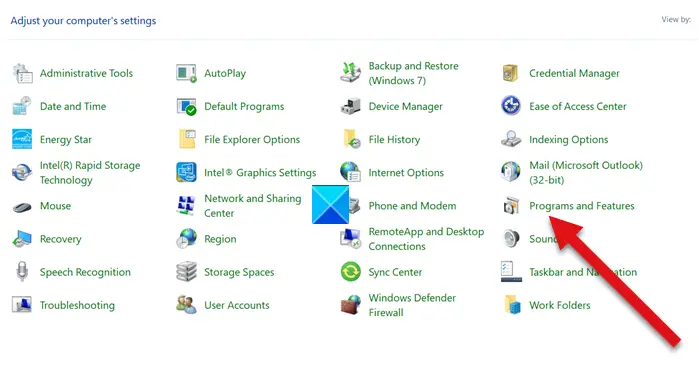
Choose Programs and features entry from the list.
Next, click the Turn Windows features on or off link under the sidebar (left).
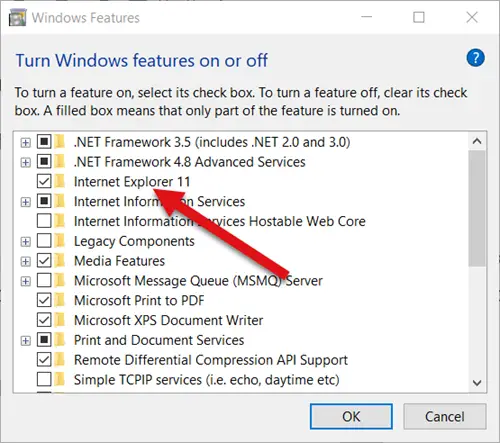
In the Windows Features dialog that appears, locate the Internet Explorer option. A checked box next to it means that the feature is turned on. To turn it off or disable Internet Explorer completely clear the checkbox and press OK.
Turning off the browser might affect other Windows features, including default settings. If you don’t mind this change proceed further and when prompted with a message, hit the Yes button.
Wait for Windows to apply the changes and press the Restart now button to restart the computer right away. Following this step, Internet Explorer will be turned off and disabled completely in Windows 10.
To reinstall it again, you need to simply select the checkbox again.
Users who prefer to use alternative browsers may find this tip to be of interest.
That’s all there is to it!
