
Whenever you click on any folder icon, explorer.exe opens. Click on any folder inside it and explorer.exe will open this folder also in the same process. This is so, by default, File Explorer opens all folders within the same process.
Open Folder in New Process in Windows 11/10
However, should you wish to open a particular folder in a different process you can do so easily?
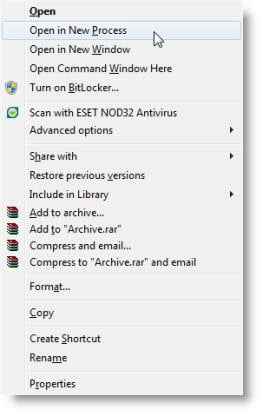
In Windows 10, simply press the Shift key and right-click on the folder you wish to open in a new process. From the context menu option, click Open in New Process.
In Windows 11, press the Shift key and right-click on the folder you wish to open in a new process. Then select Show more options. Now from the context menu option, click Open in New Process.
Explorer.exe will now open another instance, and the folder will be opened as a new process.
It is to be noted that Open in New Process is different from Open in the new window.
In the latter case, two folders could be running in the same explorer.exe process. Opening a folder in a new process is useful, as if one instance of explorer.exe were to crash, the other process would still be up and running.
Always launch folder windows in a separate process
If you want to always open a folder in a separate or new process, do the following:
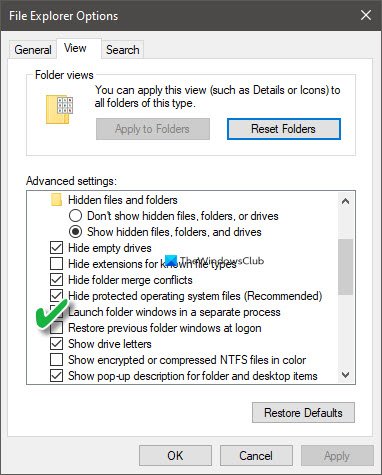
- From Taskbar search, search bar, and open File Explorer Options
- Click on the View tab
- Select Launch folder windows in a separate process
- Click Apply > OK and exit.
- Restart Explorer.
Useful if your Windows explorer crashes frequently and you need to troubleshoot.

