
When you hover your mouse cursor over the icons of the opened applications on the Taskbar, Windows shows its preview. This preview image is called Taskbar Thumbnail Preview. If you find the preview size of the Taskbar thumbnails a little smaller, you can change them and make them bigger. There is a simple way to change the size of Windows 11/10/8/7 Taskbar Thumbnails. In this article, we will show you how to increase the Taskbar Thumbnail Preview size in Windows 11/10.
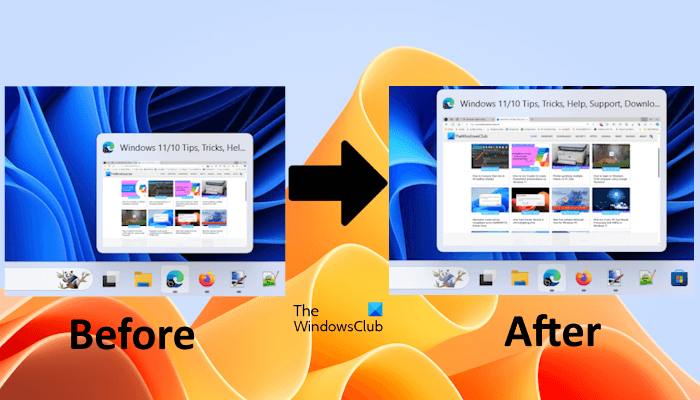
Increase Taskbar Thumbnail Preview size in Windows 11/10
To increase the Taskbar Thumbnail Preview size in Windows 11/10, you have to modify the Windows Registry. Because this method requires modifications in the Windows Registry, follow all the steps carefully, as incorrect modifications in the Registry can make your system unusable. We recommend you create a System Restore Point and back up your Registry before you proceed. This will allow you to revert the changes on your system if any problem occurs.
Open the Run command box and type regedit. After that click OK. In the UAC prompt, select Yes. This will open the Registry Editor. Now, navigate to the following location. The easiest way to go to this location is to copy the following path and paste it into the address bar of the Registry Editor. After that, hit Enter.
HKEY_CURRENT_USER\Software\Microsoft\Windows\CurrentVersion\Explorer\Taskband
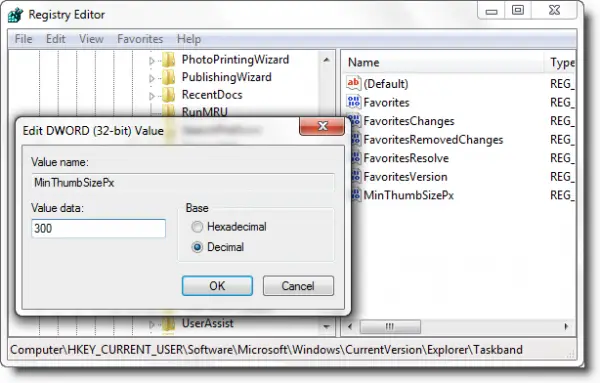
Make sure that the Taskband key is selected on the left side. Now, look for the In the MinThumbSizePx value on the right side. If this value does not exist on the right side, create it manually. To do so, right-click in the empty space on the right side and select New > DWORD (32-bt) Value. Name MinThumbSizePx to this newly created value.
Now, right-click on MinThumbSizePx and select Modify. Select the Decimal option for its base and then enter a value, say 300. Click OK to save the changes.
Exit the Registry Editor, sign out, and then sign in to your account. Alternatively, you can also restart the Windows Explorer through the Task Manager.
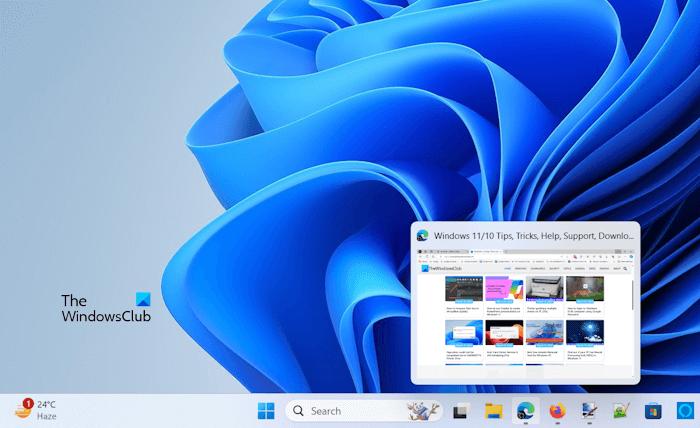
You will now see that the taskbar thumbnail size has increased. If not, restart your computer.
If you want to restore the default Taskbar Thumbnail Preview size on your system, delete the MinThumbSizePx value from the Registry Editor. Simply right-click on it and select Delete. After doing this, restart Windows Explorer or restart your system.
That’s it. I hope this helps.
How do I show preview on Taskbar Windows 11?
By default, the Windows 11 Taskbar shows a preview of the opened apps when you hover your mouse cursor over the respective icons. However, if you want, you can disable the Taskbar Thumbnail Preview. This can be done via System Settings, Registry Editor, and Group Policy Editor. If you cannot see the Taskbar Thumbnail Preview, you can check your system Settings.
How do I change the size of icons in Windows 11?
In Windows 11, you can easily change the size of the icons. If you want to change the desktop icon size, right-click on your desktop and select the View option. Now, you can select the Small, Medium, and Large icons. This option is also available in File Explorer. Alternatively, you can also use the mouse scroll button by pressing and holding the Ctrl key.
Related:

