
If you have vision problems, you can make the text bigger on your Windows 11/10 PC via Windows Accessibility Settings easily. You don’t even need to use any third-party software to do this. Let us see how to do it.
If you have difficulty reading the text on your screen, you can always use the Windows Magnifier to enlarge parts of the screen. But if you are looking to make the change permanent, you can do that too.
Increase font size or text size in Windows 11
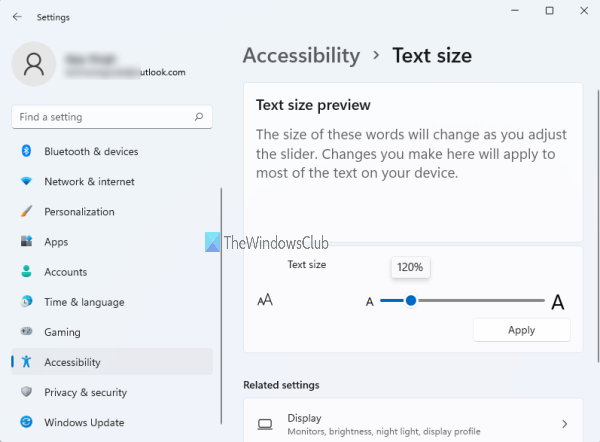
By default, the font size or text size on Windows 11 computers is set to 100% which is OK for most users. But, if that is not satisfactory for you, then you can increase text size between 100% to 225%. Let’s check the steps:
- Use Win+I hotkey to open Windows 11 Settings app
- Click on the Accessibility category available on the left section
- Click on the Text size menu available under the Vision section on the right-hand part
- Move the slider left to right available for the Text size section. As you move the slider, the Text size preview is also changed in real-time to get an idea
- Click on the Apply button.
After that, Windows 11 will start applying the changes. Once it is done, the new text size is visible. After that, you will see bigger text on file names, File Explorer, browsers, Start menu, and other applications.
Make Text bigger on Windows 10
You can increase the Font size and make Text bigger and easier to read.
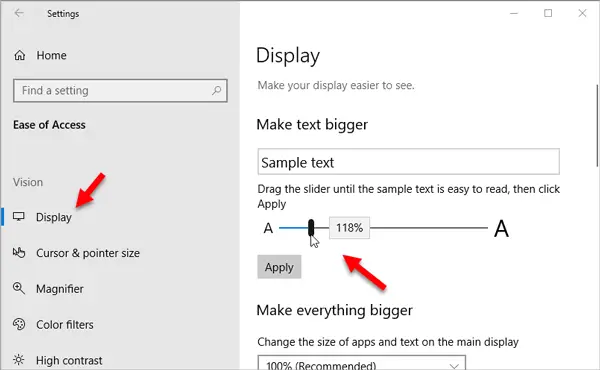
To make it big or small or to change the Font size you have to access Windows 10 Ease of Access Settings.
Open Windows Settings panel. You can press Win + I button together to open that on your machine.
Following that, go to Ease of Access > Display.
On your right-hand side, you will find a slider with a label called Make text bigger.
You can move the slider from left to right to make the text bigger. You can find the preview right above the bar.
After choosing a particular size, hit the Apply button. It will change the text size immediately.
In Windows 8.1/8/7, open Control Panel > Appearance and Personalization > Display > Make text and other items larger or smaller.
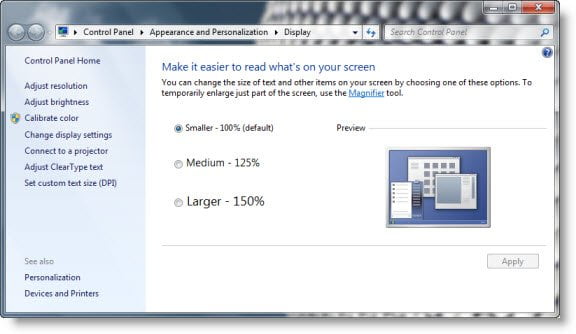
Here you can increase the font size by 125% or 150%. make your selection. This works as follows:
- Smaller – 100% (default). This keeps text and other items at normal size.
- Medium – 125%. This sets text and other items to 125% of normal size.
- Larger – 150%. This sets text and other items to 150% of normal size. This option appears only if your monitor supports a resolution of at least 1200 x 900 pixels.
Click Apply and Logoff.
You will see that all text, including your Start Menu appears bigger now in Windows 10/8/7/Vista.
Please note that this option will not increase the size of the icons and other items.
It will make only text bigger than the default. If you use a very high value, it could skew the results.
How do I increase text size in Windows?
Whether you want to increase the text size in Windows 11, Windows 10, or lower versions of the Windows OS, the Windows operating system has a built-in option to adjust the text size or font size that appears throughout Windows and other apps. Depending on the Windows version you’re using, it lets you increase text size from 100% to 150%, 200%, etc. The article covered here includes all the options to help you increase text size in Windows.
Can you make the text size bigger on computer?
Yes, definitely. If you are a Windows user, there are two native ways to increase the text size on your computer. One way is to use the Magnifier app of Windows 11/10. The Magnifier app lets you increase zoom level to more than 1000%. Once you have opened the app, you just need to use + icon to increase the zoom level and it will immediately zoom in on your screen. Wherever your mouse cursor goes, the bigger text and the zoomed-in part are visible.
The other option is simply increasing the entire Windows text size. To do this, you need to use the Settings app and adjust the text size. This post covers all the steps in the above section. You can also preview bigger text and then apply the changes. After that, the Desktop, the Start menu, and other apps will show bigger text.
