
Show desktop or Aero Peek lets you ‘peek’ behind all the windows so that you can look at your Windows 10/8/7 desktop, should you wish to access any gadgets or shortcuts. It does so by making all the open windows transparent.
Aero Peek feature in Windows 10
Aero Peek was introduced in Windows 7. If you have many windows open on your desktop, it’s quite easy to lose track of them. Aero Peek lets you ‘peek’ behind all the windows so that you can have a look at your Windows 10/8/7 desktop, should you wish to access any gadgets or shortcuts. It does so by making all the open windows go transparent. To do so, you must move your cursor to the extreme right part of your taskbar and hold it there. Or else click Win+Space.
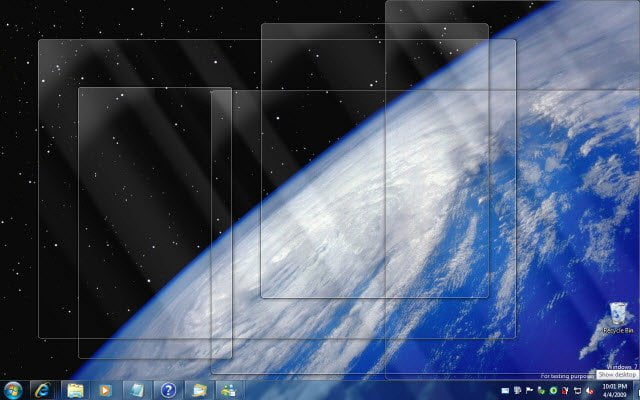
If you press on that panel, all the open windows get minimized and your desktop is shown.
With Aero Peek, you can also choose to preview any particular open window, while hiding all the others.
To do so, move your cursor to the taskbar button which you want to preview. A taskbar preview, ie a small window will appear.
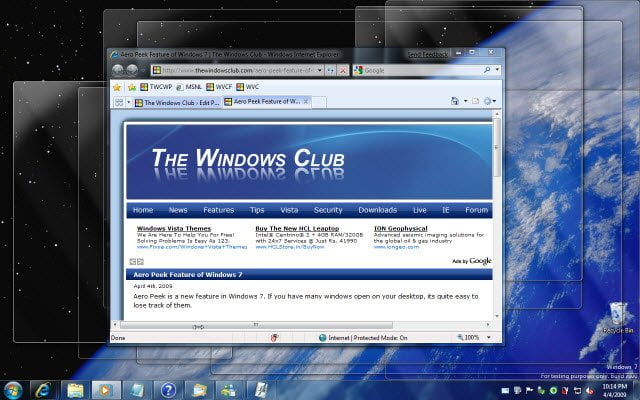
Move your mouse over this small taskbar preview. You will see all the open windows, except this one, get hidden.
If you don’t like or use this Aero Peek Feature in Windows, you can easily disable it.
How to Enable or Disable Aero Peek at desktop in Windows 10
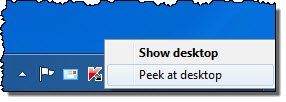
To disable Aero Peek, move your cursor to the bottom right corner and right-click. Here, uncheck the option Peek at Desktop.
Alternatively, right-click on the Windows Taskbar and select Properties.
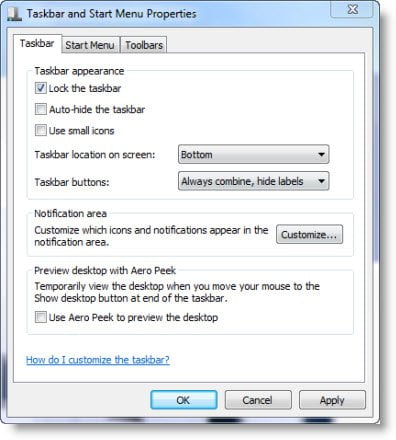
Uncheck the option Use Aero Peek to preview the desktop.
Click Apply > OK.
You can also disable Aero Peek via Control Panel > Performance > Visual Effects, if you wish.
That’s it!
This post will show you how to enable or disable Show Desktop on taskbar in Windows 11.
Related: Show desktop not working or missing in Taskbar in Windows 11.

