
Double Driver is a freeware to back up Windows Drivers. While Windows offers the plug-and-play feature, you might want to back up some installed drivers if you don’t have the Driver CD that came with the computer or are unavailable online.
Drivers are programs that hook directly into Windows and control the essential tasks of communicating your instructions to a hardware device and then relaying data back to you. To know what hardware drivers are installed on your computer and to view their details: Right-click Computer > Manage > System Tools > Computer Management > Device Manager.
How to Back up and Restore Drivers
While Windows 11/10/8/7/Vista offers the plug and play feature, you might want to backup some installed drivers, if you don’t have the Driver CD that came with the computer or they are unavailable online. This comes in quite handy if you purchase a computer and want to back up the initial set of drivers. It can be quite difficult, for example, to find drivers for hardware installed in a notebook if the operating system has to be set up again.
Double Driver for Windows 11/10
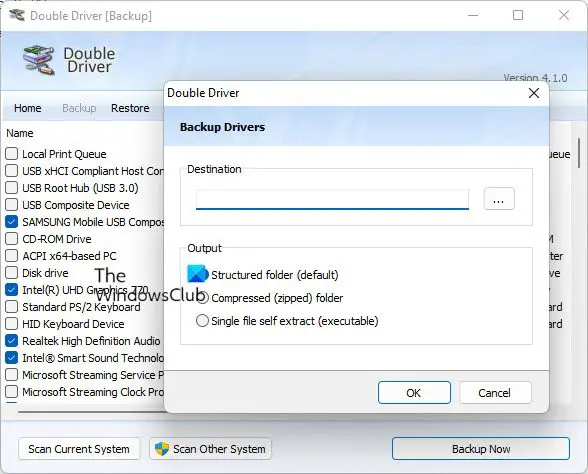
Double Driver is a very simple and useful tool that not only allows you to view detailed information of all the drivers installed on your system but also allows you to backup, restore, save and print all chosen drivers simply and reliably.
It analyzes your system and lists the most important driver details, such as version, date, provider, etc and offers you the chance to update to the latest version. All drivers that are found, can easily be backed up and restored at a later point in one go.
You can download the working version from here. While the tool appears to have not been updated for long, I checked it on my Windows 11 PC, and it worked just fine!
This post shows how you can how Backup and Restore Drivers in Windows. You can also use the built-in Device Manager to manage, backup, restore your Drivers. Then there are freeware like Driver Fusion, Free Driver Backup, etc, that help you easily backup and restore drivers.
These links may interest you:

