
If you use Microsoft Outlook on Windows 11/10, as your default email client, then you may have noticed that, when you minimize Outlook, it minimizes to the taskbar and continues to occupy space. This can create a problem if you have too many programs open in the taskbar. If you always have it open, then rather than having it sit in the taskbar, you may wish to minimize Outlook to the system tray or notification area. If this is the case, you can do it as follows.
Minimize Outlook to System Tray in Windows 11/10
To minimize Outlook to the system tray, you can use the Outlook system tray icon’s content menu or edit the Registry.
1] Minimize Outlook to System Tray using UI
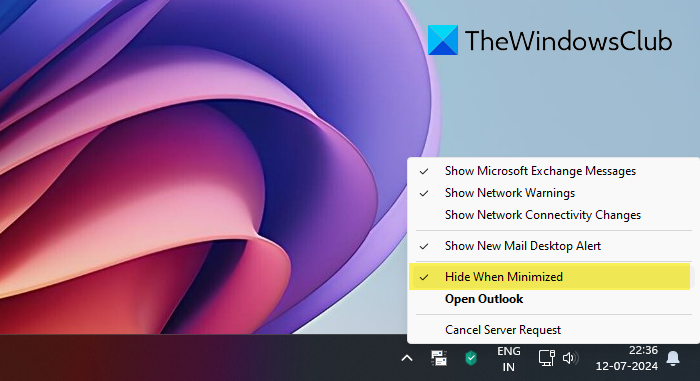
- To minimize Outlook to the system tray, right-click on the system tray icon of Outlook.
- Next, select Hide When Minimized from the menu offered.
- When you do this, Outlook will disappear from the taskbar and stay minimized in the notification area only.
If you wish to open Outlook again, simply double-click on the Outlook system tray icon, and it will open.
2] Using Registry
If you wish to make the change by editing the Windows Registry. After you have created a system restore point, Run regedit to open the Registry Editor, and navigate to the following key:
HKEY_CURRENT_USER\Software\Microsoft\Office\15.0\Outlook\Preference
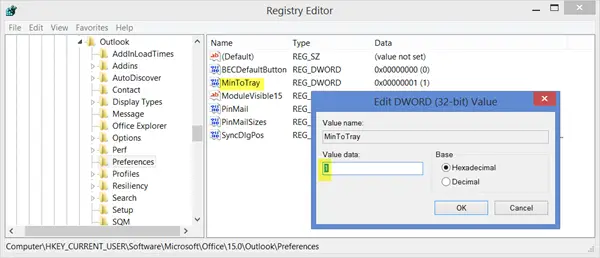
In the right pane, give MinToTray DWord, a value as follows:
- 0 : Will minimize Outlook to the Taskbar
- 1 : Will minimize Outlook to the System Tray
A small but useful tip!
Outlook closes when minimized
If you think that Outlook closes when you click on the minimize button, then know that it does not close but is actually minimized to the Notification area. To change this behavior and make the Outlook windows minimize to the taskbar, uncheck the Hide When Minimized option as explained above.
How do I change the layout of Outlook in Windows 11?
To change the layout of Outlook in Windows 11, go to the “View” tab, select “Change View,” and customize your preferred view settings. You can also choose additional options like “Compact” or “Single” to adjust the folder display to suit your needs.
Check this post if you want to find out how to add Holidays to Outlook Calendar.
