
Windows 11 is one of the hottest topics in the market right now. People want to know whether they can install the new OS on their system, or is it worth upgrading the new Windows. One of the most interesting things about a newly released OS is its wallpapers. And Windows 11 is no different, people want to know where they can download the wallpapers and how good they are. That’s why we created this article. So, if you want to download Windows 11 Bloom wallpapers in different colors for your PC, this is the place for you.
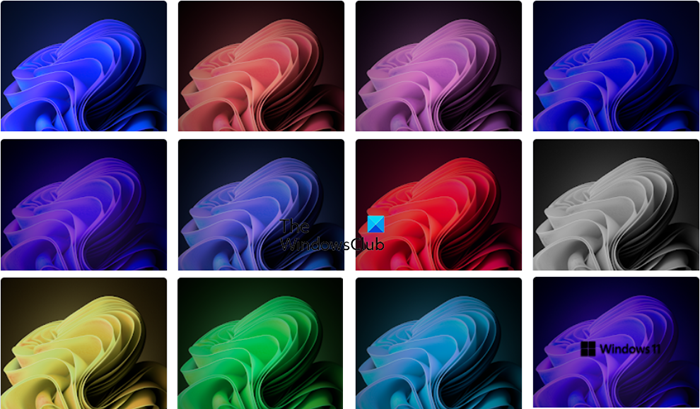
Download Windows 11 wallpapers
Not all of us want to upgrade to Windows 11 as Windows 10 is still supported and also, you may be from a different ecosystem such as MAC or Google. If you have a Chromebook or a MAC, then there is no point in getting a different OS just to experience the aesthetics of Windows 11. You can download some good Windows 11 wallpapers and switch between them to keep things fresh and lively.
There are numerous places where you can download Windows 11 wallpapers. Some of these places are genuine, while others are merely a portal to distribute adware or display ads. Whatever the case may be, there is no point in taking the risk; that’s why we recommend downloading the wallpapers from a trusted source. That’s why we’ve compiled some really nice and safe places to download high-quality Windows 11 wallpapers.
Visit these links to download them:
- Drive.google.com
- Pantone colors from the Microsoft Store
- Reddit.com
- Baltana.com
- HDwallpapers.in
- Windows 11 Snow wallpapers
- Wallpaperhub.app – Windows 11 SE wallpaper.
If you know of any other links, please do share them in the comments section.
These places are safe for you to download some amazing wallpaper for free. You can go to any of the listed sites as all of them are free and none of them is spam.
Then go ahead and apply them on your computer. Now, go ahead and apply the downloaded wallpapers to your computer.
Want more? Take a look at more Wallpapers and Background pictures for Windows desktop.
How do I set a Wallpaper on Windows 11?
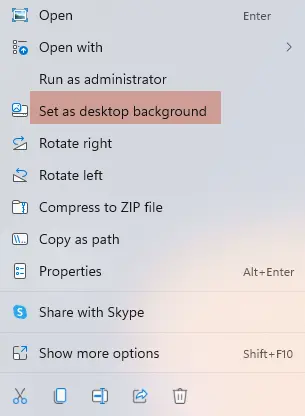
To set or change the wallpaper on Windows 11, follow the given steps.
- Simply right-click on the wallpaper and select Set as desktop background.
- You can also open Settings on your Windows 11 computer.
- Click Personalization > Background.
- Then select one from the default wallpapers.
- If you want to set some other wallpaper, click Browse Photos.
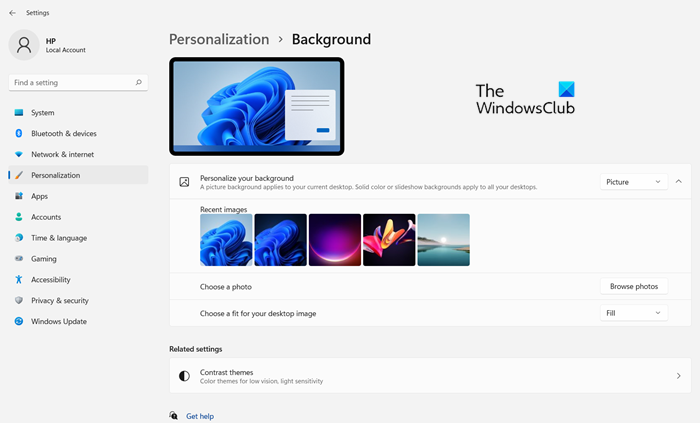
From there you can select photos of your choice from the location where you have stored them.
Read: How to set different wallpaper on different desktops.
Where can I find Windows 11 wallpapers?
To see the location of the wallpapers and lock screen images, open File Explorer and navigate to the following location:
C:\Windows\Web
Here you will see three folders:
- Wallpaper
- 4K
- Screen
- TouchKeyboard (Windows 11 only)
In the Wallpaper folder, you will see the default wallpaper being stored.
Read: How to extract wallpapers from Windows Themepack.
That’s it!
Read next: How to change Theme, Lock Screen & Wallpaper.
