
Most free PDF readers allow us only to open and view PDF documents. Many free online tools allow us to create PDF Documents. If you are on a platform like Microsoft Windows, you can get software like Microsoft Word, then it’s even easier to create PDF documents. Just save them as PDF documents. While you can also use Google Chrome to save Web Pages as PDFs, the browser cannot convert documents; for that, you might have to either opt for software or online tools.
Software to create, convert, password protect PDF
PDF documents are mainly used for security and the protection of the data and its information. For this purpose, we use secure passwords to protect our crucial data to be always protected. In this article, we will show you how to create and convert any printable documents to PDF and add extra security in the form of passwords. We will take a look at:
- PrimoPDF
- BeCyPDFMetaEdit.
Using PrimoPDF and BeCyPDFMetaEdit free software, you can create, convert and password-protect your PDF documents.
1] PrimoPDF
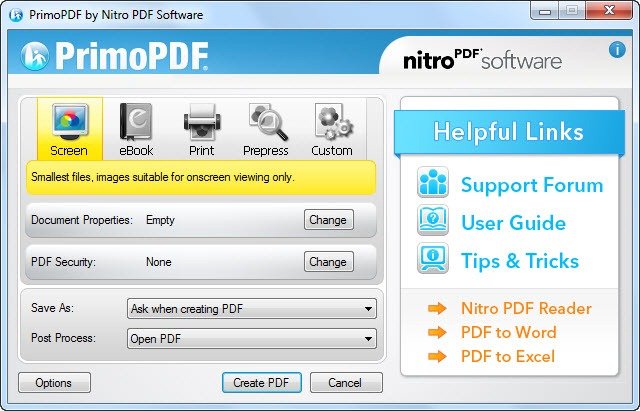
For this purpose, you may use PrimoPDF, a tool that can be used to convert PDF documents even if you are opening a web page in the browser or Word document, and if that is in printable format, then it can be converted into appropriate PDF format.
You can download PrimoPDF from here. Please be careful during installation and opt out of bundleware, if any.
Once you download and install PrimoPDF on your Windows, then you will have to select PrimoPDF option available on the Print window rather than selecting a physical printer option.
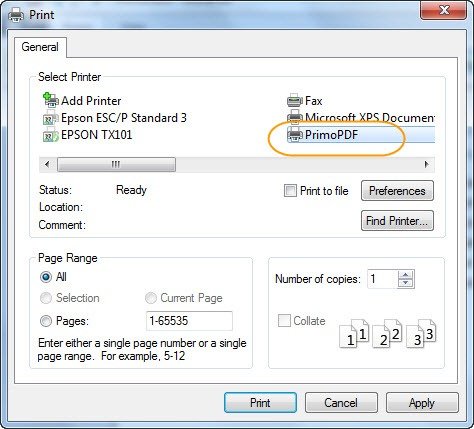
This process is very similar to creating and saving the application in your local system.
2] BeCyPDFMetaEdit
Now the next step will be to get a free application named BeCyPDFMetaEdit which is used to add a password to a PDF document or even remove the password if it’s already there.
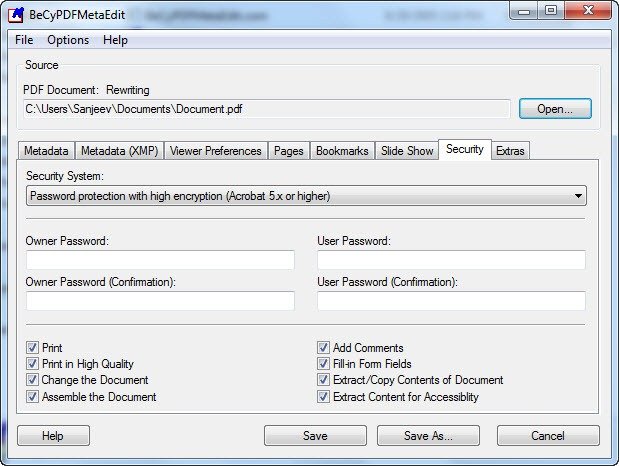
Once you are done with the installation, you can then go on to “Security Settings Panel” and choose the “Security” tab, and select “High Encryption Password Protection” and then enter your password. You can also select the appropriate restriction to put onto that file. This tool is available here.
Other similar free PDF creator software that allow you to create PDF documents:
If you know of any other free ways to achieve this, please do share in the comments.
Here is a list of links to posts that will show you how to password protect documents, files, folders, programs, etc. in Windows.

