
If you have built a new computer and wanted to test it, or if you need to identify hardware faults on your existing system, you will want to consider subjecting your computer to a PC Stress Test. A PC Stress test software for Windows will perform various tests on the parts of your computer like processors, graphics, memory, physical disk, optical drive as well as networks. But it is something that you should subject your PC to, very often, as such a test will subject your hardware to excessive stress to find out how well they perform under such stress.
If you are on a new system, you may carry out these tests with some ease of mind, but if you are on an old system or suspect that some part of your hardware may be failing and you want to identify which one, then you may want to first back up your data before carrying out such a PC Stress Test, since your components may be placed under severe stress.
Do note that you should never run these tests on unstable, old or overclocked systems, as it can lead to a crash or system failure, and make sure you know where the Stop button is, just in case you feel you need to stop the test.
Here are some free PC Stress Tools that will help you check most of your components like CPU, GPU, RAM, Disk, Optical drives, etc.
PC Stress Test free software for Windows 11/10 PC
Here are some of the best free software to test your hardware:
- Memtest86+
- StressMyPC
- HeavyLoad
- Passmark Tools
- FurMark
- System Stability Tester
- SiSoft Sandra Lite
- Prime95
- Auslogics BenchTown
- Nero DiscSpeed
- CrystalDisk
- PC Wizard.
1. Memtest86+
Windows 11/10/8/7 has an inbuilt Memory Diagnostic Tool. But if you want to check the stability of RAM, Memtest86+ is among the best tools to benchmark your memory.
2. StressMyPC
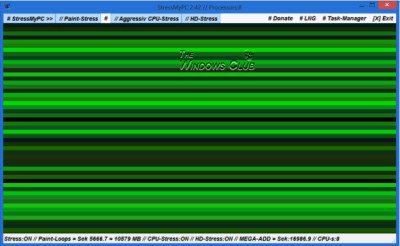
StressMyPC is a simple portable benchmarking tool. It will carry out the following tests:
- Test how long your PC battery can go before it dies down.
- Paint-Stress is a stress test for the Graphics Processing Unit (GPU)
- Aggressive CPU-Stress lays excessive stress on the Central Processing Unit (CPU)
- HD-Stress test will test the hard drive.
You can download it here.
3. HeavyLoad
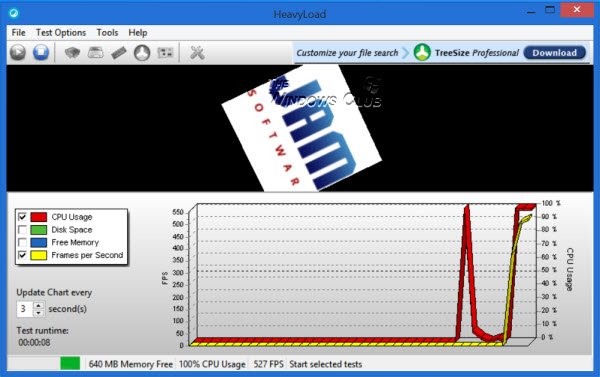
HeavyLoad is another tool to benchmark your hardware components. It is an easy-to-use all-round testing & benchmarking tool. This tool can carry out the following benchmarking tests:
- Stress CPU: Use your processor or even a specific number of processor cores to full capacity.
- Write Test File: Check how your system behaves when faced with dwindling disk space.
- Allocate Memory: Find out how well your computer works with scarce memory
- Simulate Disc Accesses: Find out how much stress your can hard disk take and check its reliability.
- Stress GPU: Check how well your graphics card handles stress.
You can download it here.
4. Passmark Tools
Passmark has released a bunch of tools that can help you test and benchmark the various components of your computer hardware. To name just a few, Sleeper will test the reliability of your system’s sleep and wake up state transitions, Rebooter is for Cyclic reboot testing, Fragger will benchmark the performance of the third-party defrag tools, SoundCheck will check the performance of PC sound cards, speakers, and microphones, DiskCheckup will check the health of your hard disk using SMART – and there are many more such.
Go get them here. Scroll down, and you will see the list of tools that are free for personal use.
Read: What does PC Benchmark mean?
5. FurMark
FurMark is another benchmarking tool to measure the performance of the graphics card.
6. System Stability Tester
System Stability Tester lets users benchmark their CPU & RAM. It can test the threads, runtime, loops, digits, states, times, checksum validations, and so on.
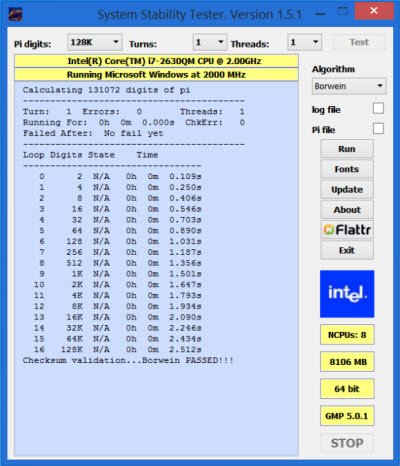
It is available at SourceForge.
7. SiSoft Sandra Lite
SiSoft Sandra Lite offers to test your computer processors, graphics, memory, physical disk, optical drive, and networks. Using this tool, you can get information about the CPU, chipset, video adapter, ports, printers, sound card, memory, network, Windows internals, AGP, PCI, PCIe, ODBC Connections, USB2, 1394/Firewire, etc.
8. Prime95
Prime95 is a popular tool that offers to stress-test your processor. It also includes a Tortue Test that can hammer your CPU to see the stress it can handle. Visit its download page to get it free.
9. Auslogics BenchTown
Auslogics BenchTown is a Windows Benchmark tool that lets you judge the performance of your computer and compare your configuration and ratings with your friends.
10 Nero DiscSpeed
Nero DiscSpeed is a portable freeware created by the developers of Nero, which allows you to benchmark CD and DVD drives and check the media quality.
11. CrystalDisk
CrystalDisk will help you Benchmark & Monitor Hard Disk & USB Drives.
12. PC Wizard
PC Wizard apart from being a system information tool is also a utility designed to analyze and benchmark your computer system. It can analyze and benchmark many kinds of hardware, such as CPU performance, Cache performance, RAM performance, Hard Disk performance, CD/DVD-ROM performance, Removable/FLASH Media performance, Video performance, and MP3 compression performance. It is now no longer mentioned.
TIP: There are some more free PC benchmarking software listed here.
I am sure there must be many more! Let me know if I missed any.
How do I check my computer’s performance in Windows 11?
Though there exist many free tools for this, Performance Monitor is one of the best options to check computer performance in Windows 11/10. It is a built-in system monitoring app in Windows 11/10 that lets you monitor the system resource usage in real time. It also lets you generate a detailed system performance report that includes system response times, the status of local hardware resources, etc.
What to do if Windows 11 is running slow?
To speed up Windows 11/10, then you can try some handy solutions. First of all, you should remove unwanted apps and programs from the Startup list. You should also remove unnecessary apps from running in the background, remove the pre-installed apps that you don’t need, and clear junk and temporary files from your system. Selecting the high-performance plan can also be helpful but it will drain the battery more quickly than the balanced power plan.
These links may also interest you:
- Free tools to benchmark CPU and GPU
- Linpack Xtreme is an aggressive benchmarking & stress testing software
- HD Tune is a hard disk performance, benchmarking, information tool
- Benchmark & test Hardware components of PC using UserBenchmark
- Fix random computer freezes and reboots caused due to hardware problems
- Free web browser performance benchmark test tools.

