
Windows 11/10/8 introduces a new feature, which was not available in Windows 7 or earlier. This feature gives you an option, whereby you can prevent or allow the “This destination already contains a folder named” warning dialog box from appearing, when you are moving or copying a folder, with the same name, from one destination to another. If Windows 11/10 is not showing a duplicate warning when copying files and folders, you need to check these settings.
Folder Merge Conflict in Windows 11/10
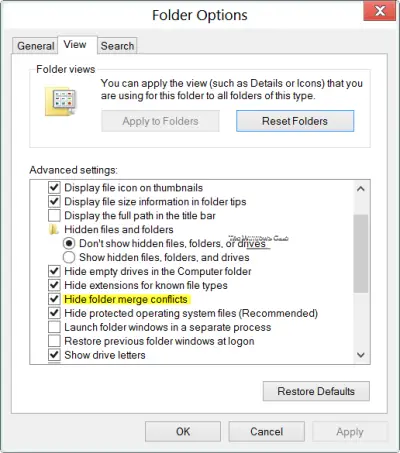
To show or hide Folder Merge Conflicts during a Move or Copy operation in Windows 11/10:
- Open Folder Options
- Click on the View tab
- Locate Hide folder merge conflicts
- Check or uncheck this option as per your wish
- Click Apply/OK and Exit.
To configure or change this option, you will have to open the Folder Options and click on the View tab. Here you will see a new option – Hide folder merge conflicts. This was not present in Windows 7.
By default, Windows 11/10 has kept this option checked. In this case, the warning box will not be displayed if there is a folder with the same name at the destination too.
Windows 11/10 will not ask for confirmation if a folder with the same name exists in the destination location as well. By default, the contents of the folder will be merged into the ‘destination’ folder.
The warning prompts for file conflicts, however, will still be displayed, should the folders contain files with the same names.
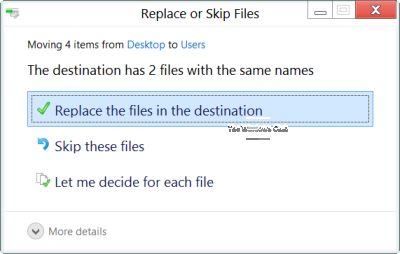
If you uncheck the option Hide folder merge conflicts and click Apply, then when you move a folder with the same name into the destination folder, which includes another folder with the same name, you will get to see a warning dialog box for folder conflicts too.
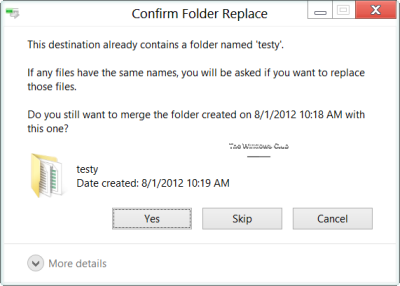
By offering this option and keeping it pre-checked by default, Windows 11/10 does away with any unnecessary warning box, and yet provides users the option to change the default, according to their preference.
Read: How to Merge Folders in Windows
Enable or Disable Folder Merge Conflicts using REGEDIT
Open Registry Editor and navigate to the following key:
HKEY_CURRENT_USER\Software\Microsoft\Windows\CurrentVersion\Explorer\Advanced
On the right side you will see HideMergeConflicts.
- Double-click on it and change its value data to 0 to enable folder merge conflicts
- Double-click on it and change its value data to 1 to disable folder merge conflicts
Hope this helps!

