
If you have recently upgraded your Windows computer or installed any Windows Update, and are facing a problem where you see the login screen appearing twice, you can fix the problem by using these solutions.
Login screen appears twice in Windows 11/10
There is a major bug where some people need to log in twice, i.e. entering the password two times before they can log into the Windows and continue with their work. I personally faced this issue where I was required to log in twice to access the desktop.
- Disable Use my sign-in info to automatically finish setting up my device after an update or restart setting.
- Disable Users must enter a username and password to use this computer
- Remove duplicate usernames.
1] Disable Use my sign-in info to automatically finish setting up my device after an update or restart setting
If you were using some older Windows version and you have recently installed a Windows 10 Feature Update, your system will automatically use the sign-in information to make the device ready for the new update. This is the main reason, why you see the login screen once more even after entering the login credentials.
You can disable this feature from the Windows Settings panel. Go to Accounts > Sign-in options. On your right-hand side, you should find a Privacy category. By default, the Use my sign-in info to automatically finish settings up my device after an update or restart option is enabled.
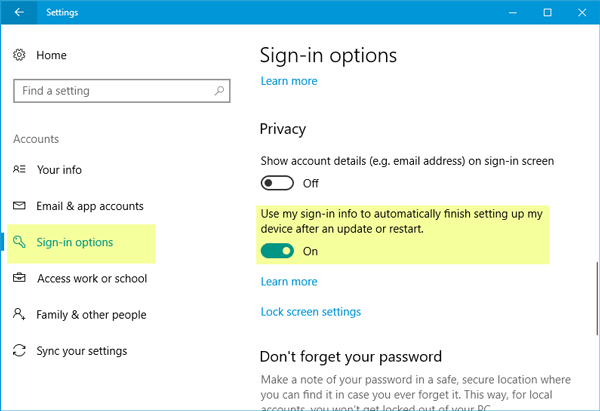
You should toggle the button to the Off position to disable this functionality. After that, you should not find the same problem on your machine.
2] Disable Users must enter a username and password to use this computer
Although the solution mentioned above works in different cases, you can also use this trick to get it done. Open the User Accounts settings. To do so, press Win + R, type netplwiz and hit the Enter button. You will find an option called Users must enter a username and password to use this computer. By default, this option is enabled. You need to remove the mark from the checkbox.
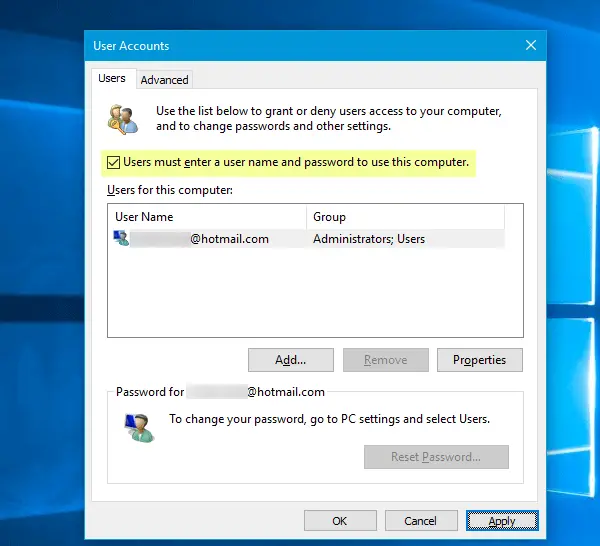
Now, you need to enter the username and password and restart your computer. After restarting your PC, open the same dialog box and re-enable that same functionality.
In simple words, you have enabled auto login and disabled it again.
See this post if User must enter a username and password to use this computer option is missing.
3] Remove duplicate usernames
- Open RUN Dialogue box from the Start Menu, and enter netplwiz.
- There will be two different usernames with the same name (since I have already resolved the issue once I don’t have duplicate usernames.).
- Remove one of the users and you will be fine with the issue.
- Restart the window and see if the issue is solved.
I hope this helps.
Why does my computer make me login twice?
If your user profile has some corrupt files, it may ask you to log in multiple times. In order to get rid of this problem, you can disable the Use my sign-in info to automatically finish setting up my device after an update or restart setting and remove duplicate usernames. A detailed guide is mentioned here, and it is recommended to follow it minutely to troubleshoot the log in issue.
Read: PC always boots twice before starting in Windows 11
How do I get rid of dual login?
To get rid of dual login, you need to disable the Users must enter a username and password to use this computer setting first. Then, you can also turn on the Use my sign-in info to automatically finish setting up my device after an update or restart setting. However, if these two solutions do not work, it is suggested to check whether your PC has duplicate usernames or not.
Hope these suggestions help you.
Related read: Windows logon screen appears twice when you resume computer from Sleep
