
Windows Safe Mode is one option which is very useful when you need to do carry out some troubleshooting. If you find that Safe Mode is not working, and you are unable to boot your Windows 11/10/8/7 computer in Safe Mode, this post suggests some steps you may try to fix the problem.
The Safe Mode uses the minimum required set of device drivers and services to start the Windows operating system. To boot into Safe Mode, one normally press F8 at boot-time. The procedure to boot Windows in Safe Mode is a bit different.
Cannot boot in Safe Mode in Windows 11/10
But you may at times that you are even unable to boot into Safe Mode. Here are some troubleshooting steps you may want to try to fix your safe mode. Since you can boot normally, you can use these methods:
- Run System Restore
- Run System File Checker
- Reset Windows OS
- Troubleshoot in Clean Boot State
- Use a desktop shortcut.
1] Run System Restore
Try a System Restore to a prior good point when Safe Mode was working and see if it helps.
2] Run System File Checker
Type sfc /scannow in an administrative command prompt and hit Enter to run your System File Checker. It may take a while. Go get a coffee or something till it runs the scan. Once complete, reboot, try again and see if it has helped.
3] Reset Windows OS
Windows 11/10 users may use Reset This PC option or run DISM.
Related: Windows Safe Mode stuck; Booting hangs or goes in a loop.
4] Troubleshoot in Clean Boot State
Type MSConfig in start search and hit Enter to open System Configuration utility. Here, under Boot tab > Boot options, check Safe boot and Minimal. Click Apply/OK. Restart.
When you’re done working in Safe Mode, go back to msconfig and remove the checkmark from Safe Boot.
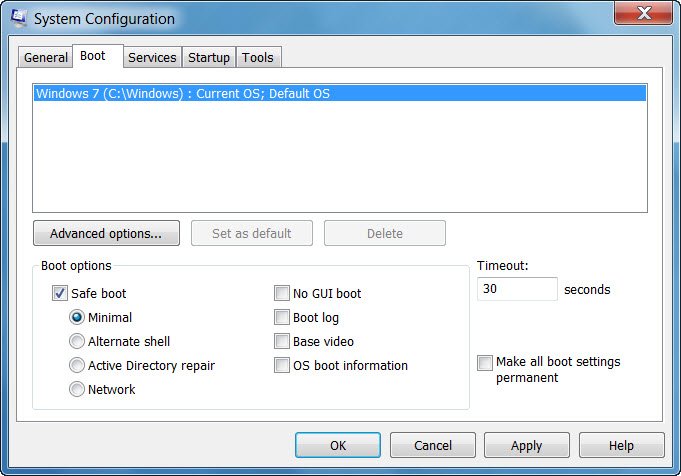
Do note that this sort of, forces your computer to boot in Safe Mode – your computer could therefore possibly go in a loop it is still unable to boot into Safe Mode. So use this as a last option and use it only if you know what you are doing. See this post if your PC is stuck and cannot exit Safe Mode.
5] Use a desktop shortcut
Create a desktop shortcut to reboot your PC in Safe Mode. Right-click on your desktop, select New > Shortcut. In the Location field, copy-paste the following path:
C:\Windows\System32\msconfig.exe -2
Click next and name the shortcut as, say, Restart Options.
Windows Safe Mode not working
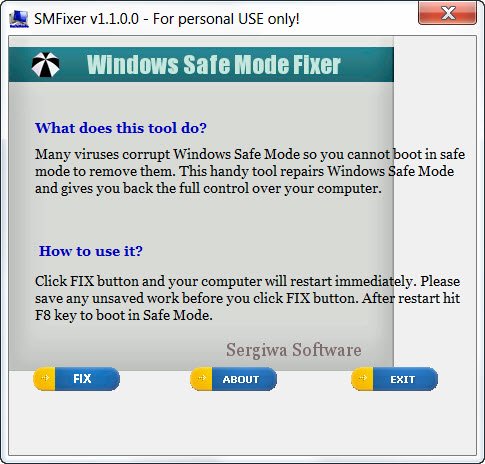
There is also a free software called Safe Mode Fixer that promises to fix your broken safe mode.
While I have not tried it, you may want to create a system restore point first and then download it out and take a considered call on it.
I hope something helps you.
These links too are sure to interest you:

