
When you start Windows 11/10, you are asked to enter your password to be able to log in. This is to protect your Windows PC from unauthorized access. But if you are the only person to use the PC and if you do not wish to be asked for the password every time, you may turn off Windows login screen on startup and log on directly and automatically into Windows, without entering a password.
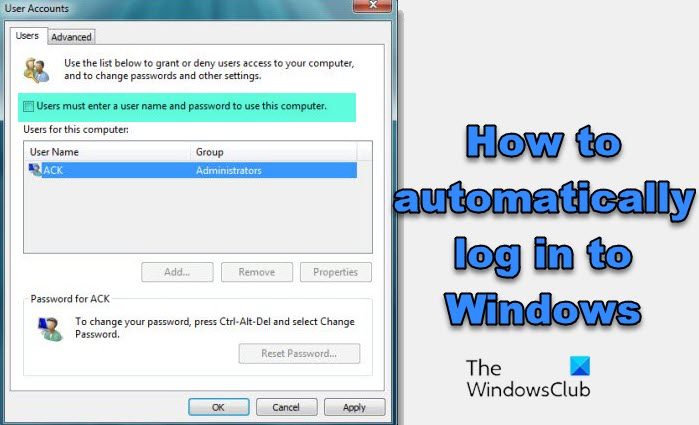
How to automatically log in to Windows 11/10
To turn off the Windows login screen on startup & log on automatically to Windows, do the following:
- Open the Run box, type control userpasswords2 or netplwiz and hit Enter to bring up the User Accounts window.
- Uncheck Users must enter a user name and password to use this computer
- Click Apply > OK.
TIP: See this post if User must enter a username and password to use this computer option is missing.
This brings up a window where you may be asked to enter the password for your account. If the account is a local account and does not have any password, just leave it blank.
Restart your computer.
This will remove the Login Password for Users. Once you have done this, you will find that you will be able to log on automatically to your Windows computer, without seeing the login screen and having to enter your password or credentials.
NOTE: For your information, you can also Bypass the Login Screen in Windows using Microsoft Autologon utility or by tweaking the Windows Registry.
This post will help you if Windows auto-login is not working.
How to disable or remove Login Password for Users in Windows?
There are three methods to disable or remove Login Password for Users. These are:
- Using netplwiz (Local Account)
- Using Windows Settings (Local Account)
- Remove login password using Command Prompt
What do I do if Windows Login screen not appearing?
If the Windows Login screen not appearing, then follow these suggestions:
- Run System Restore
- Try Ctrl+Alt+Delete combination
- Users must enter a username and password to use this computer
- Disable Fast Startup
- Troubleshoot in Clean Boot State
- Create a New User account
- Run Fresh Start
- Run Startup Repair.
Also read:
- Manually Make Windows Auto Login After Sleep Using Registry
- Log into Windows automatically after exiting Sleep
- Prevent Automatic sign-in after installing Windows Updates.
