
If your Microsoft Outlook does not display the envelope icon when mail arrives, you restore this behavior with the help of the following setting on your Windows 11/10/8/7 PC.
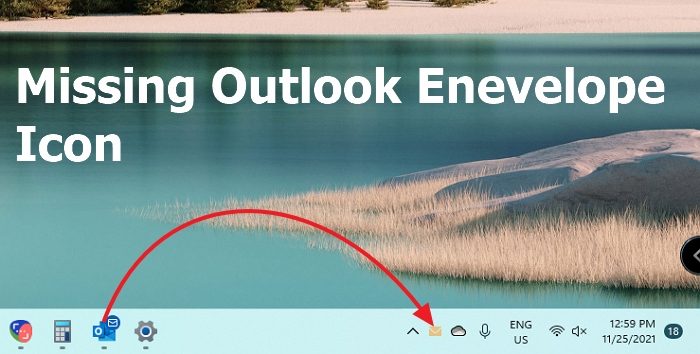
Restore missing Envelope icon of Outlook
There are a few ways to fix this missing icon
- Enable from Outlook Options
- Enable from Taskbar Settings
- Opt to show Taskbar Icon Badges
Make sure to check on both the settings.
Outlook new email envelope icon is not showing in Taskbar
1] Enable from Outlook Options
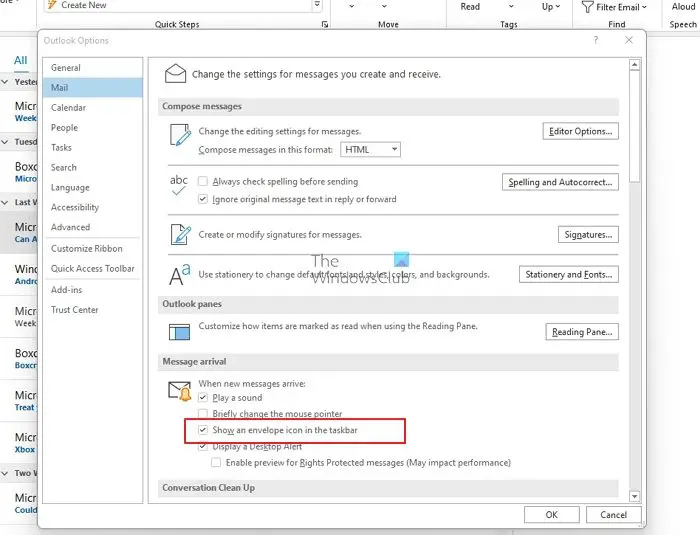
Envelope icons are essential as it helps you to know if there is a new email that was arrived. If you don’t have this enabled, you will have to either use the mouse hover to see the mail count or open Outlook every time to check. If you are not able to see the icon, then here is how to restore it.
- Open your Microsoft Outlook desktop client and click on the File tab. Next, click on Options.
- Select Mail in the left-side navigation pane.
- In the Message arrival section, click to select the “Show an envelope icon in the taskbar” check box.
- Click OK.
Your Microsoft Outlook will now display the envelope icon/overlay when any mail arrives.
PS: Outlook’s new mail icon is only visible if you use large icons; i.e., it changes and shows an envelope only if you use large icons on your Taskbar.
2] Enable from Taskbar Settings
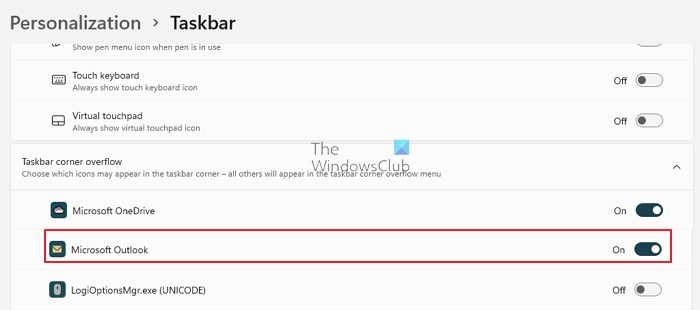
Taskbar corner overflow lets you choose which icons appear in the taskbar corner. All others appear in the overflow menu, i.e., you see them when you click on the up arrow button on the Taskbar. To customize the Notification area icon, follow these steps:
- Open Windows Settings (Win + I)
- Navigate to Personalization > Taskbar
- Expand the Taskbar corner overflow section
- Toggle on the Microsoft Outlook, which looks an icon
- You should see the envelope appear instantly.
There is another Microsoft Outlook option, but it only adds it to the Taskbar to launch Outlook.
3] Opt to show Taskbar Icon Badges
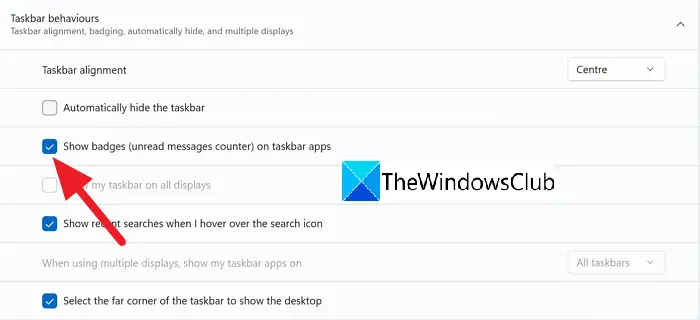
Select the Show badges on Taskbar apps option and see if it helps.
I hope the post was easy to follow and you cannot see the new email envelope icon from Outlook.
Do I need to enable Envelop Icon enabled in Outlook?
If you keep Outlook always open, you don’t need to. The Outlook app icon on the Taskbar will display a mail icon in its style. But since the yellow icon is eye-catchy, it is often preferred.
Are there other ways to get a notification about an email from Outlook?
Windows Focus assist allows you to see all notifications that are sent by an app. Outlook also adds any notification in the Action Center, and you can get an idea of all incoming emails there.

