
Fix: Desktop items disappear after renaming them on Windows 7

On renaming a file, folder or shortcut on the Windows 7 desktop, if you find that it disappears, and reappears only after you refresh the desktop, then you might want to check out the reason.
uac never notify 600x445 Fix: Desktop items disappear after renaming them on Windows 7


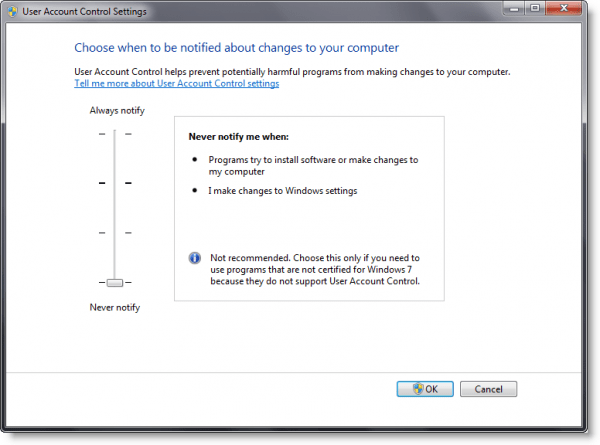
This usually occurs if the User Account Control (UAC) is set to “Never Notify” for the logged on user.

If you find this happening frequently, you may have to set the UAC to the Default setting of “Default – Notify me only when programs try to make changes to my computer”.

If however, changes are made to the default UAC setting, you can do one of the following:

1. Keep C:\Users\Public\Desktop folder window opened on the user’s desktop while doing rename operation

2. Press F5 on user’s desktop when this problem happens.

Should help! Sourced from KB2018895.

If you have liked this post, you might want to check out some more, on topics like , .

About AnandK@TWC

Anand aka HappyAndyK is an end-user Windows enthusiast, a Microsoft MVP in Windows Desktop Experience since 2007, and the Admin of TheWindowsClub.com, TheGeeksClub.com & WinVistaClub.com. Creating a System Restore Point before trying out a new software or a tweak is always recommended.
Follow on Google: +AnandK@TWC

Ads

Random Posts

  • http://www.angrytechnerd.me.uk Michael

    Thanks for this tip, I was experiencing this problem and did not realise that there was this bug in Win 7, lets hope that MS get this fixed.

© 2012 The Windows Club All Rights Reserved