
Your Windows doesn’t recognize DVD? If your Windows 11/10 can’t find DVD or CD drive or if your CD or DVD drive is not detected, showing, reading or working, or will not read or write media on your Windows 11/10/8/7 PC, then follow this post to troubleshoot the issue.
Why is my computer not detecting my CD DVD drive?
There can be many reasons why your computer is not detecting your CD or DVD drive. The most common cause is the corrupted driver. Open the Device Manager and see if there is a warning sign under the CD/DVD-ROM drives branch. If yes, uninstall and reinstall the driver. This issue can also occur when you have upgraded your Windows operating system or if your Registry keys are corrupted.
CD or DVD drive not working

Open the Properties of your device and see if there are any error messages displayed against Device Status-
- Code 19: Windows cannot start this hardware device because its configuration information is incomplete or damaged
- Code 31: The device is not working properly because Windows cannot load drivers required for this device
- Code 32: A driver for this device has been disabled, An alternate driver may be providing this functionality
- Code 39: Windows cannot load the device driver for this hardware, The driver may be corrupted or missing
- Code 41: Windows successfully loaded the device driver for this hardware but cannot find the hardware device.
The error message will give you the direction to work. You can see the complete list of Error Codes in Device Manager here.
Windows doesn’t recognize DVD
1] Run Troubleshooters
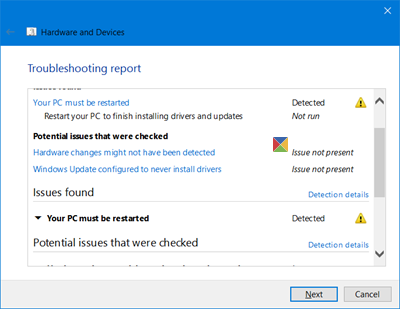
Windows 11/10 offers several built-in Windows Troubleshooters. Use the Hardware and Devices Troubleshooter and see if it helps you. To open it directly, Run the following command:
%systemroot%\system32\msdt.exe -id DeviceDiagnostic
The Troubleshooters are available in Windows 8.1 and Windows 8 too.
2] Update or reinstall the driver
Follow one of the methods below to update your drivers:
- You may check for Driver Updates via Windows Update to update your drivers
- You may visit the manufacturer’s site to download the drivers.
- Use a free driver update software
- If you have the driver file already on your computer then:
- Open Device Manager.
- Select the Driver
- Select Update Driver.
- Follow the on-screen wizard to finish updating your driver.
3] Disable and re-enable the post
Disable and then enable the DVD or CD drive or port and see if that helps.
4] Fix corrupted registry entries
If you wish, you may also fix the corrupted registry manually. Create a system restore point first and then Run regedit to open the Registry Editor. Next, navigate to the following key:
HKEY_LOCAL_MACHINE\SYSTEM\CurrentControlSet\Control\Class\{4D36E965-E325-11CE-BFC1-08002BE10318}
In the right pane, click UpperFilters. Delete it.
In the right pane, you will also see LowerFilters. Click on it and Delete it too.
Restart your computer.
5] Create a registry subkey
If the above manual registry fix does not help you, create a new registry subkey and see if that helps you.
Navigate to the following registry subkey:
HKEY_LOCAL_MACHINE\SYSTEM\CurrentControlSet\Services\atapi
Right-click atapi > New > Key. Type Controller0 and hit Enter.
Now right-click Controller0 > New, and then click DWORD(32-bit) Value. Type EnumDevice1, and hit Enter.
Next, right-click EnumDevice1, click Modify, type 1 in the Value data box, and then click OK.
Restart your PC.
Can Windows 11 burn DVD?
Yes, you can burn a DVD in Windows 11. First, place your DVD in the DVD writer on your Windows 11 computer, then copy your data into the DVD. Now, right-click on the DVD and select Burn. If you do not see the Burn option in the right-click menu, select Show more options. Alternatively, you can also use free DVD burner software.
TIP: If you are facing this problem you may also see this post – CD, DVD, Blu-ray disc drive is not showing. Maybe the Fix-It will help you.
Related reads you may want to take a look at:
- If CD/DVD icons are missing, DVD Drive Icon Repair will help restore the missing icons.
- Optical Drive Tray jammed? This post will show you how to open a stuck CD, DVD, Optical Drive Tray.
We hope something here helps you.

