
If you are unable to or cannot change the User Account Control settings on Windows 11/10, you can try the following suggestions. The User Account Control basically notifies you before changes are made to your PC – not all changes, but only those which require Administrator level permissions. These changes could have been initiated by the user, by the operation system, by genuine software – or even malware! Every time such an administrator-level change is initiated, Windows UAC will prompt the user for approval or denial. If the user approves the change, the change is made; in not, no changes are made to the system. Till such a time that the UAC appears, the screen may go dark.
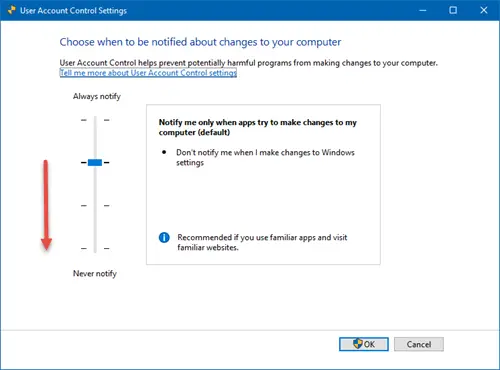
Unable to change User Account Control (UAC) settings
1] Disable antivirus
Disable your antivirus software and see if you are now unable to change the UAC settings
2] Troubleshoot in Clean Boot State
Boot in Clean Boot State if you can disable UAC.
Read: UAC Yes button missing or grayed out.
3] Edit Registry
Run regedit to open the Registry Editor and navigate to the following key-
HKEY_LOCAL_MACHINE\Software\Microsoft\Windows\CurrentVersion\Policies\System
On the right-side, right-click on EnableLUA and modify its value from 0 to 1. See if this helps.
- Value of 0x00000000 – Disabling this policy disables the “administrator in Admin Approval Mode” user type.
- Value of 0x00000001 – This policy enables the “administrator in Admin Approval Mode” user type while also enabling all other User Account Control (UAC) policies.
If EnableLUA does not exist, create it.
4] Check via Control Panel
There is another special scenario. In the Windows “System and Security” control panel category, the Action Center lets you change User Account Control (UAC) settings. In the User Account Control Settings dialog box, you move the slide bar control for notifications, and then you click the OK button.
In this scenario, the dialog box does not close, and no change is made. When the mouse pointer is positioned on the OK button, and you press ENTER, the dialog box still does not close, and no change is made. If you click Cancel, the dialog box closes, and no change is made, as expected.
This issue may occur when Microsoft Office 97 is installed on Windows 7. The installation of Office 97 makes a change to the registry that causes this issue. To set this right, Microsoft has released a Fix-It solution. Visit KB978591 to get the details.

