
The Windows Registry is a directory that stores settings and options for the operating system for Microsoft Windows. It contains information and settings for all the hardware, operating system software, most non-operating system software, users, preferences of the PC, etc. This post talks about Windows Registry Basics.

Whenever a user makes changes to Control Panel settings, file associations, system policies, or most installed software, the changes are reflected and stored in the registry. The registry also provides a window into the operation of the kernel, exposing runtime information such as performance counters and currently active hardware.
The Windows registry was introduced to tidy up the profusion of per-program INI files that had previously been used to store configuration settings for Windows programs. These files tended to be scattered all over the system, which made them difficult to track.
Read: When do changes to the Registry get saved?
Windows Registry Basics explained
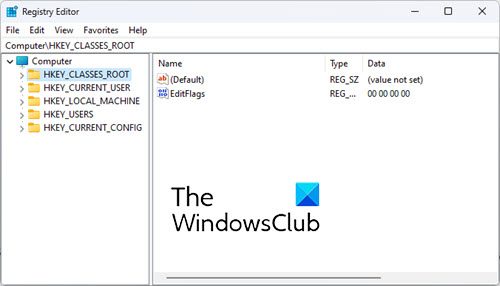
The Registry consists of the following 5 Root Keys:
- HKEY_CLASSES_ROOT
- HKEY_CURRENT_USER
- HKEY_LOCAL_MACHINE
- HKEY_USERS
- HKEY_CURRENT_CONFIG.
Root Keys contain SubKeys. Subkeys may contain subkeys of their own too and contain at least one value, called as its Default Value. A key with all its subkeys and values is called as a Hive.
The Registry is located on the Disk in the system32/config folder as several separate Hive files. These Hive files are then read into memory every time Windows starts or when the User logs on. To see where the Hives are physically stored, see:
HKEY_LOCAL_MACHINE\System\CurrentControlSet\Control\HiveList
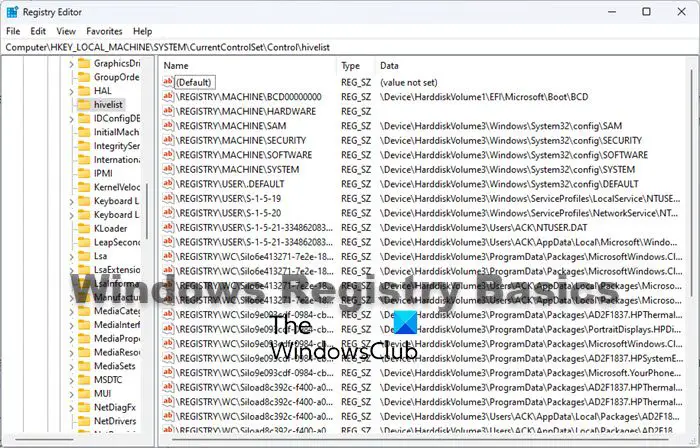
You can read more about the location of Windows Registry files.
The Registry uses the following data types:
- REG_SZ : The SZ indicates a zero-terminated string. This is a variable-length string that can contain Unicode as well as ANSI characters.
- REG_BINARY : It contains binary data. 0’s & 1’s.
- REG_DWORD : This data type is a Double Word. It is a 32-bit numeric value and can hold any number from 0 to 232.
- REG_QWORD : This data type is a Quadruple Word. It is a 64-bit numeric value.
- REG_MULTI_SZ : This data type contains a group of zero-terminated strings assigned to a single value.
- REG_EXPAND_SZ : This data type is a zero-terminated string containing an unexpanded reference to an environment variable, like say, %SystemRoot%.
Registry Virtualization in Windows
Starting with Windows Vista, along with File Virtualization, the Registry too, has been Virtualized, and hence unlike Windows XP, does not tend to suffer from bloat. The same has been continued in Windows 7.
In Windows Vista and later, the UAC utilizes the Registry Virtualization Feature, to redirect attempts to write to subkeys of
HKEY_LOCAL_MACHINE\Software
When an application attempts to write to this hive, Windows instead, writes it, to a per-user location,
HKEY_CLASSES_ROOT\VirtualStore\Machine\Software
This is done discreetly. No one gets to know that this is happening!
This is, in short, Registry Virtualization, and it is a useful Security feature.
Incidentally, mention must also be made of another new technology underlying Windows Vista and later: The Kernel Transaction Manager, which enables the Transactional Registry. This feature enables a sort of a Registry rollback. But it’s not implemented in Registry Editor. Instead, this feature is designed for use by developers who need to create robust applications using transactional processing.
Read: How to create a Registry Key in Windows.
Registry Editor
The primary tool in Windows 11/10 for working directly with the registry is Registry Editor. To access it, simply type regedit in Vista’s Start Menu Search Bar and hit Enter!
You have to be doubly careful when working with the Registry, as there is no confirmation prompt or a click OK to save prompt. Changes made are directly incorporated.
You can read more about Windows Registry Editor Tips & Features. Users can now use the Address Bar to jump directly to any registry key.
Mention must specifically be made of the
HKEY_LOCAL_MACHINE\System\CurrentControlSet
hive, as the keys in this particular location, are so essential for Windows to start, that its backup is maintained, which you can restore when necessary, simply by booting in Safe Mode and selecting Last Known Good Configuration in earlier Windows versions.
You might want to read these posts too:

