
With many free and useful software packages available for download today one can sometimes create hilarious animation. Here, I am referring to EyeRoller, an application that helps you create funny faces using photos of your friends or colleagues, display it on your Windows desktop – and make their eyes follow your mouse cursor.

This free software replaces static eyes in an image by moving ones. You simply need to import (load, download or create) a face in EyeRoller. A built-in face editor, then allows you to define the eye mask and choose the iris from the library included. Once specified, you can see the eyes rolling in an image. The eyes will follow your mouse cursor and the results are incredibly funny!
EyeRoller allows sharing of the animated images with your group of friends or download the best faces you find from EyeRoller faces gallery.
How to use Jockersoft EyeRoller
- Download the EyeRoller Setup file (415KB size).
- Run the application and choose an installer language. Please note that you need to have Microsoft .NET Framework version 2.0 or higher for using the application.
- Choose a destination folder for saving the file and later click on ‘Install’ to install the application.
- When done, you will notice a window on your computer screen. Right-click on the window to import a face and create funny faces.
- You can also download readymade faces from its Faces Gallery.
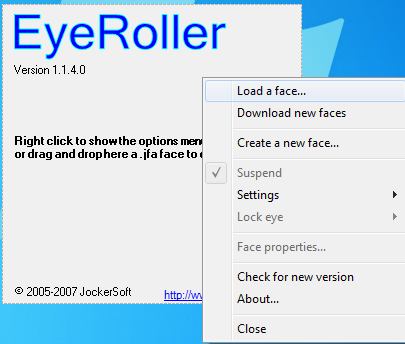 You can go to the ‘Settings’ section and access various options available under ‘Iris’, ‘Eye’ and ‘Face’ tabs.
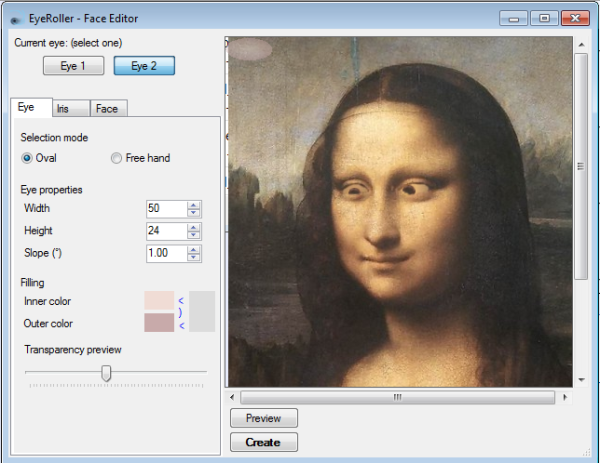
I tried replacing the static eyes of Mona Lisa, the most famous painting in the history of art with the movable ones.
The results were indeed funny!
In all, EyeRoller holds good potential if you are looking for some laughs on your Windows desktop! Go get it here.

