
Windows 8 introduces a new experience called Proximity. The Proximity Service enables applications on your Windows 8 PC to exchange information with another PC when you bring your PC and the target device very close to each other.
Windows Proximity Feature
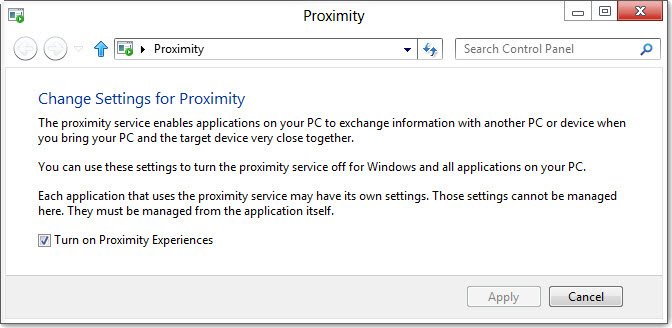
Proximity in Windows 8 supports near-field communication devices that enable communication between computers using a tap gesture. Proximity supports establishing a connection between peer applications on separate computers with a tap, and subscribing for and publishing of messages while devices are within proximate range.
Near Field Communication or NFC is a set of standards for computers and smartphone devices to establish radio communication with each other by touching them together or bringing them into close proximity, usually no more than a few centimeters. It works even if your device is switched off or your battery is drained.
You can use these settings to turn the Proximity service off for Windows and all the applications on your computer.
Each application that uses the Proximity service may have its own settings. Individual settings will have to be managed from the individual apps itself. Here you can only turn ‘on’ or ‘off’ the global Proximity feature.
To do so, uncheck or check the Turn on Proximity Experience check-box and click on Apply.
Create Windows Proximity Settings Shortcut
To access the Proximity service easily, create a new desktop shortcut using the following procedure:
Right-click on desktop > New > Shortcut > In the Type the location of the item box, copy-paste
%WinDir%\explorer.exe shell:::{8060B2E3-C9D7-4A5D-8C6B-CE8EBA111328}
Click Next > Give it a name and click Finish. A desktop shortcut will be created. You can click on the shortcut to open the Proximity settings quickly.
Go here if you want to see more such new CLSID’s and shortcuts.

