
If you want to display all active Windows hotkeys list, then these two freeware ActiveHotkeys & HotKeysList will display the global hotkeys in Windows. A global hotkey is associated with a particular nonchild window and allows you to activate the window from any part of the system.
Display Global Hotkeys in Windows 11/10
1] HotKeysList
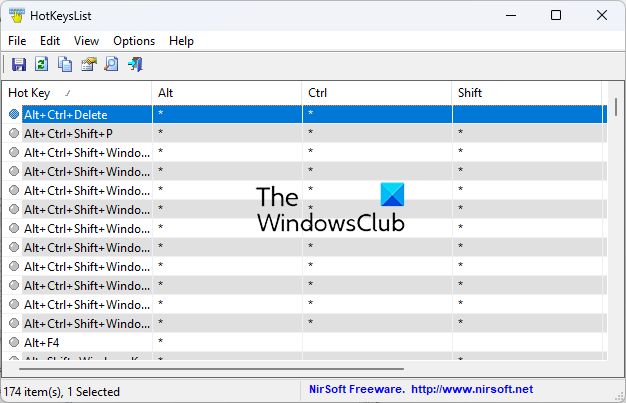
This is is a simple tool from Nirsoft that displays the list of hotkeys that are currently registered on your Windows system. It is a portable tool which does not require to be installed. Works on all Windows.
2] ActiveHotkeys
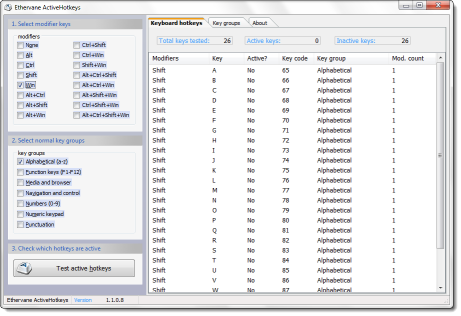
It is a nifty freeware portable utility that shows you all the currently active global hotkeys in Windows. It displays what global keyboard shortcuts are registered by various applications.
It shows a list of: Active or Registered; and Inactive & Available, global hotkeys, and supports all possible combinations of Alt, Ctrl, Shift and Win keys with regular typewriter keys.
Windows does not allow for detecting which application has registered a particular shortcut for what function, so this feature is not included in this program.
The program does not store any data in the registry. Configuration is saved in the following folder:
C:\Documents\<user>\Application Data\Ethervane\ActiveHotkeys\
This program is pretty useful as it tells you all the available hotkeys and also lets you identify which hotkeys are in use, and which are still available to be set by you.
You can download it from DonationCoder. Do read its Read Me file. Works on Windows x86.
NOTE: You can also use this script to list all assigned Keyboard Shortcut Keys (Hotkeys) for Shortcuts in Windows 11/10.
TIP: AutoHotkey is a program that allows you to create hotkey combinations for a task. You might want to have a look at this tool too.

