
The Show Desktop or Peek or Desktop Preview feature allows you to minimize all the existing windows open on your Windows 11/10 PC and visit your Desktop. People generally use it for a time out, when they feel overwhelmed by the number of tasks running on their desktop. You may not recognize this option by its name, but it is the button on the right-most area of your taskbar in the System Tray. Today, we will discuss how you can disable this Show Desktop option, or enable it if you don’t find it working on your system.
How to enable or disable the Show Desktop option in Windows 11
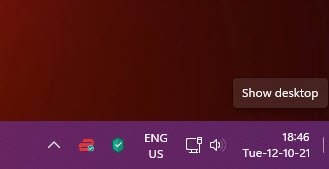
There are primarily two ways in which this can be done.
- Via the Windows Settings
- Using the Registry Editor
Let’s have a look at how both of them work.
How to enable or disable the Show Desktop option using Windows Settings
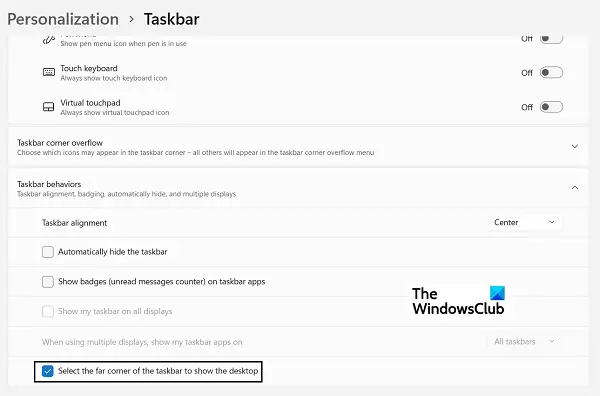
- Open Windows Settings by pressing the Windows and ‘I’ key combination
- From the options tab on your left, click Personalization and click on the Taskbar option
- You’ll see several options here, all of which have subsequent drop-downs. Here, click on Taskbar behaviors
- From the resultant drop-down, locate the option that says ‘Select the far corner of the taskbar to show the desktop’.
- If you want to disable this setting, toggle it off
The default setting is for the option to be turned on, so if you find it to be turned off and you want to use it, simply toggle it back on
How to enable or disable the Show Desktop option using the Registry Editor
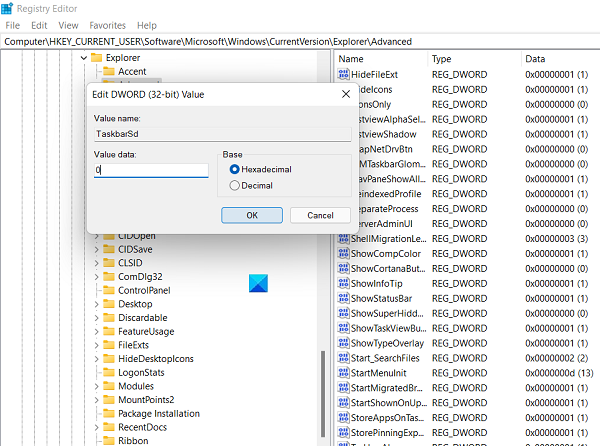
An alternative to this, one that should only be preferred by advanced users of Windows, is to make modifications to your Registry and change the D-WORD value of the relevant key. Here are the steps for the same:
- Open the Run dialog box and type ‘Regedit’ to open the Registry Editor. Then, Confirm the UAC warning
- Open the following location there:
HKEY_CURRENT_USER\Software\Microsoft\Windows\CurrentVersion\Explorer\Advanced
- Here, locate the ‘TaskbarSD’ value and right-click to modify it. If you want to enable this setting, make the bit value 1, and make it 0 to disable the Show Desktop option.
Disable Peek feature in Windows 10
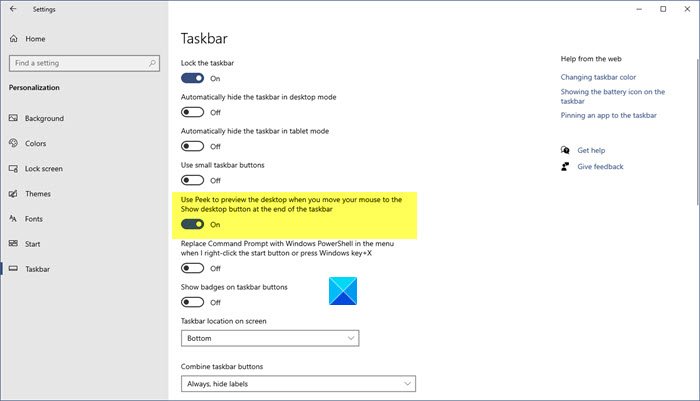
To disable Aero Peek feature in Windows 10, do the following:
- Open Settings
- Select Personalization
- OpenTaskbar settings
- Now Toggle off the Use Peek to preview the desktop when you move your mouse to the Show desktop button at the end of the taskbar switch.
If you don’t like this feature or hardly ever use it, you can always disable it.
You can also right-click on the Peek button and uncheck the Peek at Desktop option.
NOTE: This post will show you how to enable or disable Show Desktop on taskbar in Windows 11
Disable the Windows Preview feature in Windows 7
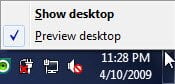
To disable the Windows Preview feature in Windows 7, right-click on the taskbar and click open Properties.
Under the Taskbar tab, you will see a checkbox to Use Desktop Preview. Un-checking it will disable this feature. Click Apply > OK.
Incidentally, right-clicking on the Desktop Preview button will also present you with this option.
Show desktop not working or missing in Windows Taskbar
If Show desktop is missing or not working in Windows 11/10, you may:
- Turn on the feature using the Settings app
- Turn off Tablet mode
- Restart File Explorer
- Create a desktop shortcut
- Re-register this DLL
- Go back to the previous version
- Reset Windows 11/10.
We hope that this post was of help to you!

