
The Disk Defragmenter in Windows 11/10/8/7 offers some additional options compared to that in Windows Vista. Its command-line version has some additional switches, which are rather useful.
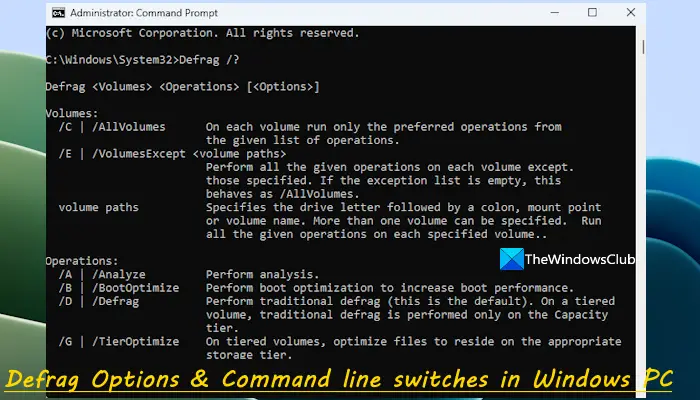
Defrag Command line switches in Windows
To begin, open an elevated command prompt window.
Type Defrag /? or defrag.exe and hit Enter. This will show you all the defragmentation options and command-line switches.
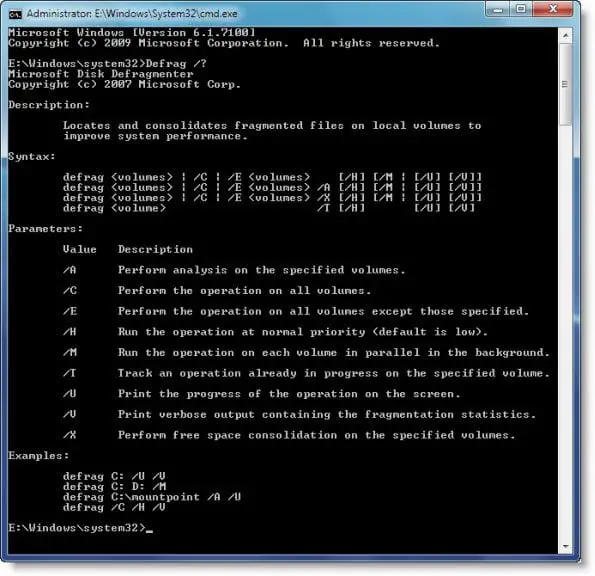
Here is the list of Defrag switches:
Value Description
/A Perform analysis on the specified volumes.
/B Perform boot optimization to increase boot performance.
/C Perform the operation on all volumes.
/D Perform traditional defrag (this is the default).
/E Perform the operation on all volumes except those specified.
/G On tiered volumes, optimize files to reside on the appropriate storage tier.
/H Run the operation at normal priority (default is low).
/I [n] Available only with TierOptimize. Tier optimization would run for at most n seconds on each volume.
/K Perform slab consolidation on the specified volumes.
/L Perform retrim on the specified volumes.
/M Run the operation on each volume in parallel in the background.
/O Perform the proper optimization for each media type.
/T Track an operation already in progress on the specified volume.
/U Print the progress of the operation on the screen.
/V Print verbose output containing the fragmentation statistics.
/X Perform free space consolidation on the specified volumes.
So, if you open cmd and type in “defrag /C /H /M” it will run defrag on all volumes, at a normal priority, in parallel.
You might also want to check out some of the best free defragmentation software for Windows.
What is the best way to defrag Windows 11/10?
The best way to defrag Windows 11/10 is by performing a full defragmentation process to the Windows drive so that the drive can be optimized in a better way to run your Windows 11/10 computer more efficiently. For this, you can either use the GUI version of the built-in tool or run the defrag c: -w command in the elevated Command Prompt window. Some defragmentation tools offer a quick defrag option which is faster but it skips certain files.
Read: What is File Fragmentation and how does it occur in Windows?
What is the shortcut for defragmentation?
There is no assigned hotkey or shortcut key for defragmentation in Windows 11/10. However, you can quickly open the Defragment and Optimize Drives window for defragmentation on your Windows PC in multiple ways. For example, you can open the Run Command (Win+R) box, type dfrgui, and hit the Enter key. Or else, you can type defrag in the Search box and use the Enter key for defragmentation.

