
We have earlier taken a look at the Customer Experience Improvement Program and seen how a user can opt-out of it easily via the Control Panel. Today, we will see how you can turn off or disable the Windows Customer Experience Improvement Program using Group Policy or the Registry in Windows 11/10.
The Customer Experience Improvement Program (CEIP) is Microsoft’s effort to increase customer satisfaction. By gathering information from people who use its software and services, Microsoft hopes to improve the quality and performance of its products. This is a volunteer program. You do not have to participate in the use of Microsoft products.
Here’s how the Customer Experience Improvement Program works:
- When installing software that is part of the program, you will be asked if you want to join the program. If you join, the Customer Experience Improvement Program runs on your computer, without interfering with your tasks or how your computer functions.
- During computing sessions, small amounts of information about how you use your computer are sent to Microsoft, to be analyzed for aggregate trends and usage patterns. This information is then used to improve the quality of Microsoft products and respond to its customers’ needs. Aside from joining the program, you do not need to do anything else.
- The information collected by the Customer Experience Improvement Program is completely anonymous. It cannot be traced back to you and contains no personal information (such as your name or location). Microsoft does not share the data collected with other companies, and the Customer Experience Improvement Program is not an advertising campaign.
- You can join or leave the Customer Experience Improvement Program at any time.
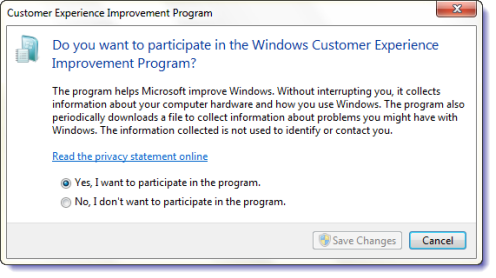
Thus, the CEIP program helps Microsoft improve Windows and its other software. It collects information about your computer hardware and how you use Windows without interrupting you. The program also periodically downloads a file to collect information about problems you might have with Windows.
Disable Windows Customer Experience Improvement Program
While it is recommended that you keep the default settings and help Microsoft improve Windows, you can, if you wish, opt out, turn off, or disable the Customer Experience Improvement Program.
To disable the Customer Experience Improvement Program, open Control Panel and type Customer Experience Improvement Program in the search bar. Click on the Change Customer Experience Improvement Program settings link in the search results. In the box which opens, select No, I don’t want to participate in the program and Save Changes. You can also use GPEDIT or REGEDIT.
Using Group Policy Editor
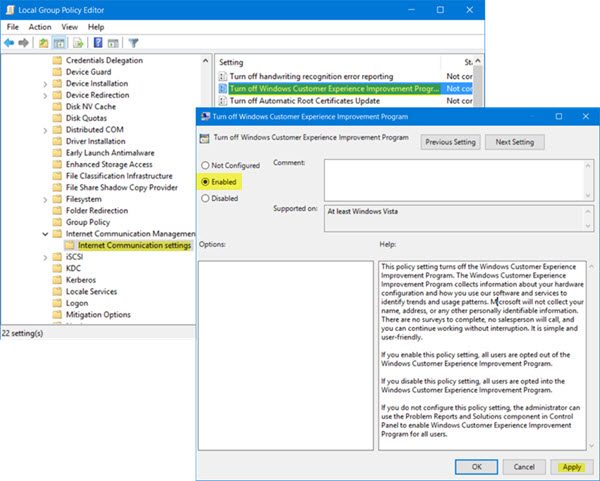
Press Windows Key + R simultaneously. In the ‘Run’ dialog box that pops up on your computer screen instantly, type gpedit.msc and click OK.
Next, when the main screen of Local Group Policy Editor opens, navigate to the following setting:
Computer Configuration > Administrative Templates > System > Internet Communication Management > Internet Communication settings
In right pane look for ‘Turn off Windows Customer Experience Improvement’ option and double-click it to open its Properties.
This policy setting turns off the Windows Customer Experience Improvement Program. The Windows Customer Experience Improvement Program collects information about your hardware configuration and how you use our software and services to identify trends and usage patterns. Microsoft will not collect your name, address, or any other personally identifiable information. There are no surveys to complete, no salesperson will call, and you can continue working without interruption. It is simple and user-friendly. If you enable this policy setting, all users are opted out of the Windows Customer Experience Improvement Program. If you disable this policy setting, all users are opted into the Windows Customer Experience Improvement Program. If you do not configure this policy setting, the administrator can use the Problem Reports and Solutions component in Control Panel to enable Windows Customer Experience Improvement Program for all users.
Select ‘Enabled’ and click ‘Apply’ and ‘OK’ to save changes.
Using Registry Editor
You can tweak the Windows Registry to disable the feature if your Windows does not ship with the Group Policy Editor. To do so, type regedit.exe in Start Search and hit the Enter to open the Windows Registry Editor.
Navigate to the following key:
HKEY_LOCAL_MACHINE\SOFTWARE\Policies\Microsoft\SQMClient\Windows
If the SQMClient and Windows keys do not exist, create them by right-clicking on Microsoft first and selecting New > Key from the context menu, and then on the created SQMClient next, to create Windows.
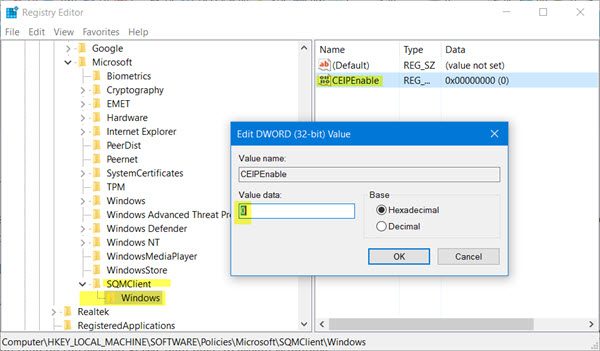
Now right-click on Windows > New > Dword (32-bit) Value. Name this newly created DWORD as CEIPEnable and set its value to 0.
Restart your Windows computer.
You can also disable the Windows Customer Experience Improvement Program by using an answer file with an unattended installation, by using Server Manager or by disabling the related task in the Task Scheduler.
Related:
- Turn off Microsoft Consumer Experiences
- Turn on or off Tailored Experiences via Settings, Registry or Group Policy.
