
When you delete a file from a removable device, such as a memory card or pen drive, Windows deletes it permanently. However, if you want to keep those files to recover after removing them accidentally from your device, this tutorial will be handy for you. It is possible to create and add a Recycle Bin for removable drives in Windows 11 and Windows 10 using this guide.
When you delete a file from your computer, it gets stored in the Recycle Bin. You can clear Recycle Bin whenever you want. The best thing about Recycle Bin is that you can get back accidentally deleted files to the original location. However, the same thing doesn’t happen with removable devices.
Any removable device or external USB device, such as pen drive, SD card, etc., does not have a Recycle Bin. Thus, when you delete a file from the pen drive, Windows removes it permanently. Although you can use the data recovery software to recover deleted files, they may not work all the time. That is why you can turn on Recycle Bin for removable drives using this guide. It is recommended to create a System Restore point before going forward.
Create Recycle Bin for USB Drive, SD Card, External Hard Drive, etc.
To create and add a Recycle Bin for removable drives like USB Drive, Pen drive, Memory card, etc. in Windows 11/10, follow these steps:
- Press Win+R to open the Run prompt.
- Type regedit and press the Enter buton.
- Click the Yes button.
- Navigate to Explorer in HKCU.
- Right-click on Explorer > New > DWORD (32-bit) Value.
- Set the name as RecycleBinDrives.
- Double-click on it to set the Value data as ffffffff.
- Navigate to Explorer in HKLM.
- Right-click on Explorer > New > DWORD (32-bit) Value.
- Set the name as RecycleBinDrives.
- Double-click on it to set the Value data as ffffffff.
- Sign out and re-sign into your account.
Let’s check out the above-mentioned steps in detail.
First, you need to open the Registry Editor on your computer. For that, press Win+R to display the Run dialog, type regedit, press the Enter button and click the Yes button.
Once the Registry Editor is opened, navigate to the following path:
HKEY_CURRENT_USER\Software\Microsoft\Windows\CurrentVersion\Policies\Explorer
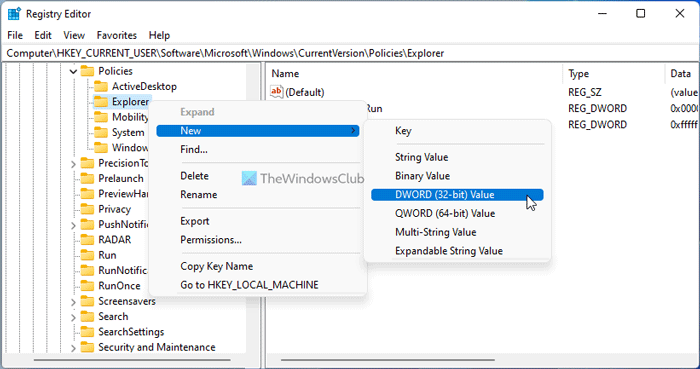
Here you need to create a REG_DWORD value. For that, right-click on Explorer > New > DWORD (32-bit) Value and name it as RecycleBinDrives.
Double-click on it to set the Value data as ffffffff.
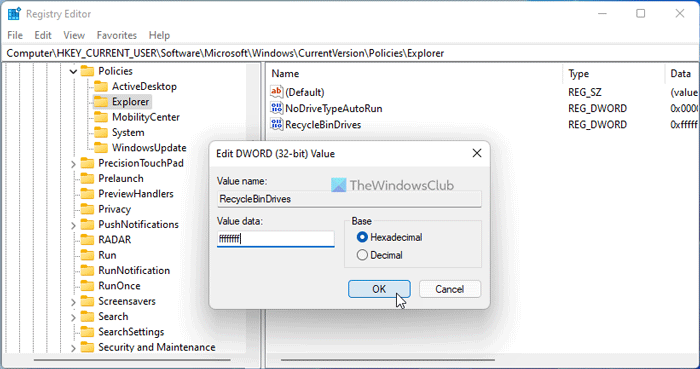
Click the OK button.
Then, navigate to this path:
HKEY_LOCAL_MACHINE\SOFTWARE\Microsoft\Windows\CurrentVersion\Policies\Explorer
You need to create another REG_DWORD value here. You can repeat the aforementioned steps to get it done. For your information, you need to enter the same name and Value data. That said, enter the name as RecycelBinDrives and set the Value data as ffffffff.
Once done, click the OK button, close all windows and sign out of your user account. Then, sign in to your account to get the change. After doing that, you can find removable drives in the Recycle Bin Properties.
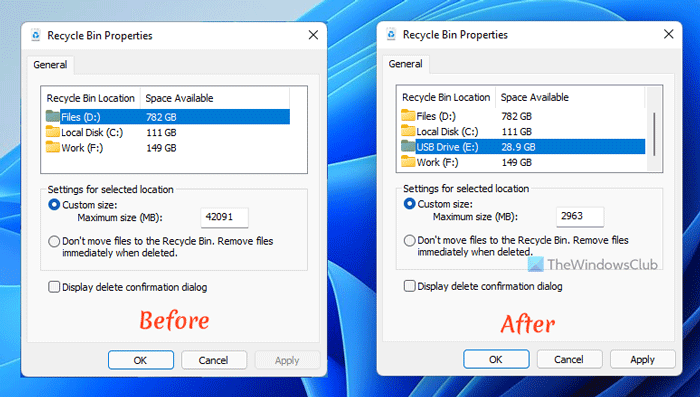
If you want to revert the change and go back to the original setting, you need to delete those two REG_DWORD values from the respective location. For that, right-click on each of them, select the Delete option and click the Yes button.
Read: How to change Recycle Bin Storage Size in Windows
Enable Recycle Bin for USB Drive & Removable Media using free software
You can also create a Recycle Bin for your USB Drive/Memory Stick/Removable Media using iBin or USB Recycle Bin software and customize it to your needs.
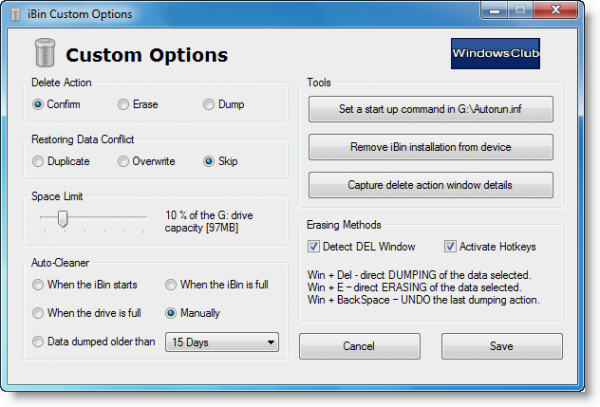
iBin freeware
The iBin software is a full portable program to work from any removable device in any Windows operating system and language environment.
Just unzip the compacted file and extract the iBin.exe file into any removable device folder. Run the iBin.exe and follow the instructions. The iBin will create the container folder and the necessary files system in the device’s root folder. Once the installation is done, the iBin work in the operating system background.
Just delete any file or folder using the Del key or a command in the right-click menu; the iBin will detect the action and offer the option to dump the files. The data selected can also be dumped or erased using hotkeys.
The iBin keep a track of every file and/or folder dumped, to be easily restored when necessary. If the dumped data is already present in the container, its name is modified. Visit iBin download page. on sourceforge.net. Do read the Documentation & User Guide.
USB Recycle Bin
USB Recycle Bin protects you from accidental file deletion from your USB drives.
USB Recycle Bin is designed to work precisely like that of Windows. Any files deleted will be sent directly to the designated USB Recycle bin for further scrutiny before actually being deleted forever, giving an excellent safeguard against unintentional data loss. It is available on softpedia.com.
How do I change Recycle Bin settings in Windows 11?
Changing the Recycle Bin settings in Windows 11 and Windows 10 is not different. Having said that, you can right-click on the Recycle Bin icon visible on the Desktop and select the Properties option. Then, you can change any given setting as per your requirements.
How do I find the Recycle bin on Windows 11/10?
If you cannot find Recycle Bin on Windows 11 or Windows 10, you can follow this linked guide. You can restore the Recycle Bin, recreate Recycle Bin, etc. Last but not least is you can repair the Recycle Bin on your computer so that you can get it back.
Hope this helps.

