
Entrusting companies with questionable reputations the job of managing your sensitive data backups entails high risks. Also, the fear of some unknown person accessing your data always looms large. Fortunately, a few online backup services are available to take care of and the necessary steps to ensure your data is kept private and properly secured. In this post, we’ll cover 5 Free Online Backup Services.
What to look for in cloud-based Online Backup Services
The amount of space being offered is one of the most important aspects. Many paid options are dedicated to backing up data using HTTPS transfer, but this article will leave them out, as I intend only the free ones. Most online backup services offer up to 2GB of free data.
I am not counting OneDrive or Google Drive here as they are more of collaboration and share tools. Besides they do not offer encryption which is another important factor when backing up your data. Mozy, Adrive, etc., offer encryption, so your data is safe even if the remote servers are hacked. There is always a possibility of cloud services being hacked, so you would want encryption. If the online service offers good space but no encryption, you can still use VeryCrypt to encrypt your files manually and back them up to remote cloud servers.
The ease of setting up and restoring data is also an important issue. Most online backup services are SAAS (Software as a Service), meaning you have to download their software to back up and restore data. They are based mainly on HTTPS protocol and do not offer FTP or other faster protocols. At least, I have yet to see any online data backup service offering FTP.
Free Online Backup Services
It is always good practice to back up data remotely to some other place so that if anything happens to your local place, you still have a backup of the original data somewhere. You might back up to another computer on a LAN in the same room. But if the room accidentally catches fire or something similar happens, you may lose data forever. The best method is to back up to the Cloud.
Cost is an important factor you should consider when planning to use online backup services. The good news is some of them don’t charge you a cent. They are completely free for personal use.
- iDrive
- Syncthing
- ADrive
- Jottacloud
- MiMedia
Let’s cover the feature and highlights of the free services in a bit of detail below!
1] iDrive
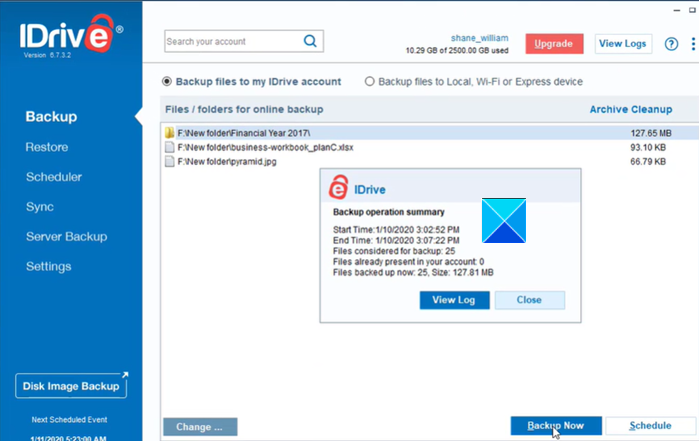
iDrive secures the first position in our list because, the service offers encryption for both transferring the data to the cloud and at the cloud, where it is backed up. The drive’s basic plan starts with 5 GB of free online storage space, and you get additional space when you recommend the service to your friends. Even with the free offering, you get to enjoy all the features of IDrive’s premium offering. However, you first need to create an account and use a private encryption key or an IDrive-managed key (the default). The online service integrates well with File Explorer. So, you can add it to right-click context menu to add items to your backup set without hassles.
2] Syncthing
Syncthing, for most users like me, comes across a free and simple solution to store my data outside Windows. Its continuous file synchronization program facilitates the process of syncing files between two or more devices securely. What makes the service different from its rivals is the fact that you, as the user, get to choose the hardware where the backup should be stored. As such, you can store the backup on a separate computer or a hard drive, virtual machine, or any other applicable device you choose. This itself gives users a robust way to manage the overall security as no third-party hosting service gets involved in storing your data. Other features that enhance its security include end-to-end encryption and TLS certificate-based authentication. Syncthing is completely free for use!
Read: What are Cloud Security Challenges, Threats and Issues.
3] ADrive
If cost and data-management-related problems worry you, ADrive can come to your rescue. It’s quite easy to use. A simple signup process with an email address and password are all that’s needed. Once logged in, you can access an online file manager by clicking on ‘My Files.’ There’s a free (ad-supported) plan called Personal Basic that lets you enjoy 50GB of storage space. However, it doesn’t offer SSL encryption or file history. As such, you cannot restore previous versions of your files.
4] Jottacloud
The online storage service lets you preview and edit Office documents and collaborate with friends and colleagues in real-time. The free plan offers up to 5GB of data storage but you can use all the premium features. For extra space, you’ll, however, need to switch to a Personal plan. A downside of using Jottacloud is that the sharing options are limited. Plus, there’s no client-side encryption. You can run the application on your phone, Desktop computer, or a server of your choice. Signup for Jottacloud.
5] MiMedia
This online storage service gives out a generous 10 GB of free storage space and offers automatic backups. That said, MiMedia has one big shortfall – it only stores multimedia files like photos, movies, music, and some documents too. Common file types with.EXE and .ZIP file extensions aren’t backed up.
It comes in two variants: a mobile app and a Windows Desktop program. It allows you to back up your media files online. If you need more space, just change your plan. There are plenty of options available.
If you are looking for desktop freeware, have a look at these Imaging, Backup, and Recovery Software for Windows. This post talks about free backup software for Windows Server.
If you think we have missed out on any popular service, mention their name in the comments section below!
