
Change the fonts & colors used for webpages in Internet Explorer

Should you wish, you can change the fonts & colors used for displaying web pages, rendered by Internet Explorer. With this, you can override website font & color settings.
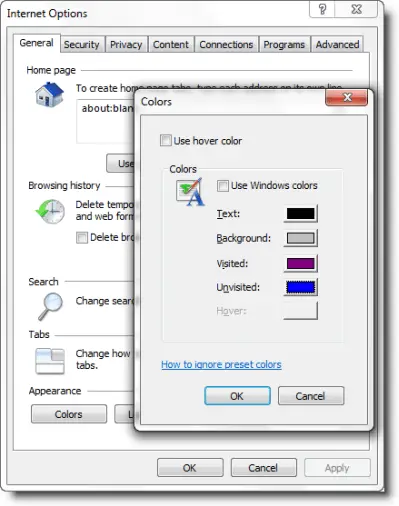
webpage color Change the fonts & colors used for webpages in Internet Explorer

To do so, open Internet Explorer > Tools > Internet Options > General tab.

To change the font, click Fonts and select the fonts you want to use. Click OK.

To change the colors, click Colors. Un-check the Use Windows colors check box.

Next click each item color box and select the color/s you wnat to use. Click OK.

These settings will however, not affect webpages that are designed to prevent changes to colors and fonts.

To override website font and color settings, open Internet Explorer > Tools > Internet Options > General tab > Accessibility.
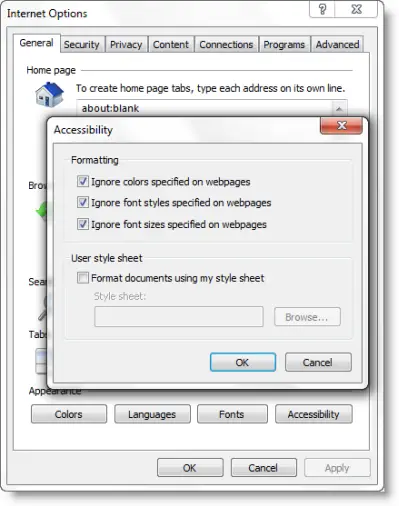
webpage ignore Change the fonts & colors used for webpages in Internet Explorer

Check Ignore colors specified on webpages, Ignore font styles specified on webpages & Ignore font sizes specified on webpages check boxes.

Click OK > Apply > OK.

If you have liked this post, you might want to check out some more, on topics like , .

About AnandK@TWC

Anand aka HappyAndyK is an end-user Windows enthusiast, a Microsoft MVP in Windows Desktop Experience since 2007, and the Admin of TheWindowsClub.com, TheGeeksClub.com & WinVistaClub.com. Creating a System Restore Point before trying out a new software or a tweak is always recommended.
Follow on Google: +AnandK@TWC

Ads

Random Posts

  • http://facebook.com/internetexplorer bryn_ie8team

    Thank you for posting this great how-to guide on changing font colors!

    You should share your post and knowledge with the IE community over at Facebook: http://www.facebook.com/internetexplorer

    Cheers,

    Bryn
    IE8 Outreach Team

  • http://www.thewindowsclub.com/ Windows Club

    I sure will, Thanks for the comment :)

  • http://facebook.com/internetexplorer bryn_ie8team

    Thank you for joining! Now you can easily keep up with Internet Explorer and communicate with other IE8 users.

    Cheers,
    Bryn
    IE8 Outreach Team

  • sese

    how about in google chrome?

© 2012 The Windows Club All Rights Reserved