
DuckLink Screen Capture is a very easy to use free screen capture tool for Windows 10/8/7, which comes with four capture modes that make screen capture easy! Capture the full screen, a window on your screen, a region of your screen, or the contents of a tall web page that scrolls.
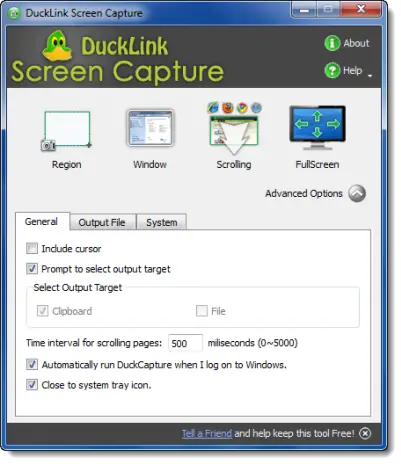
DuckLink Screen Capture Toll for Windows PC
You don’t have to waste time cropping your captures. DuckCapture exactly what you need. Capture Modes make it easy: in addition to full-screen capture, the other three useful modes:
- Capture a window: Get just the window, not the stuff behind or around it.
- Capture a region: Draw a box on the screen and capture whatever is inside.
- Scrolling Web Page Mode: Capture a tall window by auto-scrolling. Can’t fit it on the screen? DuckCapture auto-scrolls the window and grabs it all!
Go here to download it.
Requires Microsoft Visual C++ 2008 SP1 Redistributable Package, which the app will offer to install if you don’t have it.
You may also want to check out our freeware Windows Screen Capture Tool that allows you to capture full screen, selected screen area, windows, webpages, and more. You can also add watermarks to your captured screenshot or edit the image using its basic image editor.
Also, check out the new Microsoft Snip Screen Capture Tool.

