
At times, a user is required to capture a picture of what is on his screen and paste it into a document, e-mail message or some other file to demonstrate a program or a particular problem or upload it to an image-sharing website. Of many available screenshot capturing tools for Windows OS, Screenshot Captor for Windows PC is one. It offers some very useful features that an average user expects in an easy-to-use interface.
Screenshot Captor for Windows PC
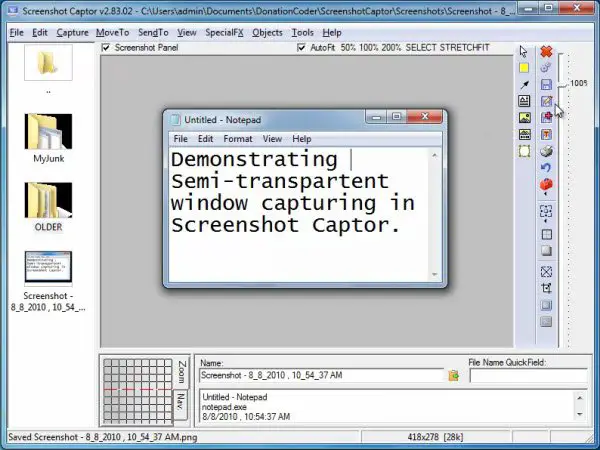
The program interface makes it easy to manage several screen-shots at once and allows users to save an image of an active window, full screen or any rectangular area as a graphics file. It endorses some basic editing features like cropping, highlighting, and resizing. In a way, Screenshot Captor helps to grab screenshots with minimal intervention.
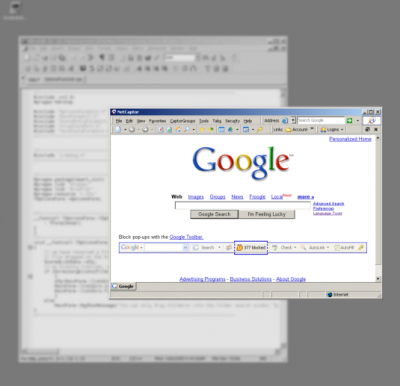
The tool also allows you to enhance the captured screenshots with several blur and shadow effects and saves them in GIF, PNG, JPG, TIF, and other formats. All the capturing modes are easily accessible from a system tray icon or via customizable keyboard shortcuts.
It now also includes a full set of scanner acquisition tools and scanner image correction, allows a perfect capture of Windows partial transparency effects, and lets you easily upload screenshots to image hosting services like Imageshack, Flickr, Photobucket, etc.
The following features make Screenshot Captor different from other screenshot utilities:
- Full set of scanner acquisition tools and scanner image correction.
- Perfect capture of Windows partial transparency effects.
- Easy automatic or on-demand uploading of screenshots to a wide variety of image hosting services
- Smart auto-naming of files, and ability to embed textual comments in files.
- Excellent multi-monitor support.
- Optional automatic image file versioning.
- Auto-scroll capture for windows too big for the screen.
- Deluxe thumbnail maker.
- Quick Post-Capture PopUp Dialog.
- Quick Screen-shot Emailer Menu.
Pros:
- Simple to use
- Great variety of capturing options
- Many filters and effects to apply
- Doesn’t take up many resources
Cons:
- Causes problems while trying to apply some effects
- Requires a learning curve
In all, Screenshot Captor establishes itself as a decent full-featured screenshot capturing program for Windows. It is free for personal use, but you have to request for a license key, every six months.
Download Screenshot Captor from here. (UPDATE: Please read comments first before downloading it)
You may also want to check out our freeware Windows Screen Capture Tool that allows you to capture full screen, selected screen area, windows, webpages and more. You can also add watermarks to your captured screenshot or edit the image using its basic image editor.

