
Advanced Tokens Manager lets you backup and restore your Windows and Office Activation files, thereby doing away with the need of activating your software every time you install it.
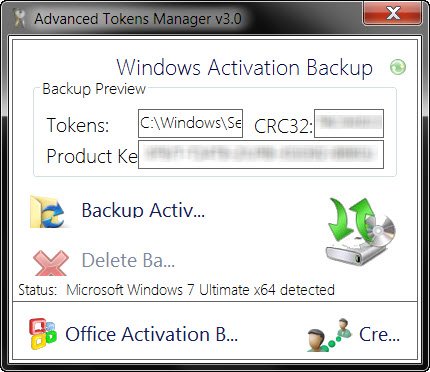
Backup Windows & Office Activation Tokens files
Windows Activation is the initial process by which a Windows running on a PC is determined to be properly licensed and genuine, and it’s really quick and easy. It is different from Registration, in the sense that, Activation is the process of ensuring that your copy of Windows is used according to the Microsoft Software License Terms, whereas registration is the process of entering information to sign up for product support, tools and tips, and other product benefits.
Every time you reinstall Windows, you have to feed in the serial and activate your copy. It may happen that you do not have an Internet connection to activate it or maybe you have run out of online activation attempts to activate your Windows copy. In such a case you can, of course, dial the Microsoft telephone number to activate it – but this entails time.
This is where Advanced Tokens Manager can help you. Using this portable freeware, you can backup, save and at a later date restore your activation files when required.
You can download it from here. The program works for Microsoft Office and Windows 11/10/Server.
What is the location of Tokens.dat file?
The activation tokens file for Windows is typically located at:
C:\Windows\ServiceProfiles\NetworkService\AppData\Roaming\Microsoft\ SoftwareProtectionPlatform\tokens.dat
The activation tokens file for Office is typically located at:
C:\ProgramData\Microsoft\OfficeSoftwareProtectionPlatform\tokens.dat
Tokens.dat is a digitally signed file, which stores most of the Windows and Office activation files. All files together have a digital signature that prevents tokens.dat be replaced on other machines, in this case, if used on different machines, will ask for online activation.
How to rebuild the Tokens.dat or Activation Tokens file?
To rebuild the Tokens.dat file, open an elevated command prompt window from the WinX Menu, and type each of the following commands one after the other. After typing in each command, hit Enter.
net stop sppsvc
cd %windir%\ServiceProfiles\LocalService\AppData\Local\Microsoft\WSLicense
ren tokens.dat tokens.bar
net start sppsvc
cscript.exe %windir%\system32\slmgr.vbs /rilc
Hope this helps.

