
If you like the idea of having multi-colored taskbar buttons, you might want to check out TaskBowFree. TaskBowFree is a taskbar with colored buttons, which you can reorder and paint as you wish by mouse easily.
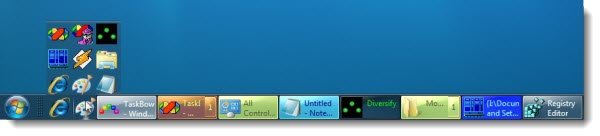
TaskBow makes Taskbar buttons colored
Once installed, TaskBow assigns colors automatically to your taskbar buttons, although they can be configured to your liking. If you exit the app, your taskbar will return to normal default.
When you first start TaskBowFree, it has several default appointment colors for applications that are commonly used, for instance, Microsoft Word, Notepad, Excel, Outlook, etc.
TaskBowFree also allows you to collect and organize programs in the taskbar, organize the Quick Launch buttons and add a special menu to the taskbar right-click.
Features:
- Drag tasks and reorder them into a taskbar
- Assign colors to programs and/or windows
- Get a compact quick launch bar, you can fill it from the taskbar immediately
- Have quick access to tasks into groups without any clicks
- Set the color tone for the taskbar.
TaskBow is a less-than 1 MB download and you can get it here. It works on Windows 10/8/7.

