Access favorite folders and files quickly from context menu with ConFavor

Speed Up My PC

I used to use FolderGuide to access my favorite folders in a click from the desktop. But having bought a new x64 Windows laptop, found that it wasn’t working on 64-bit Windows. Looking around a bit I came across ConFavor, which works on Windows 7 64-bit versions too.

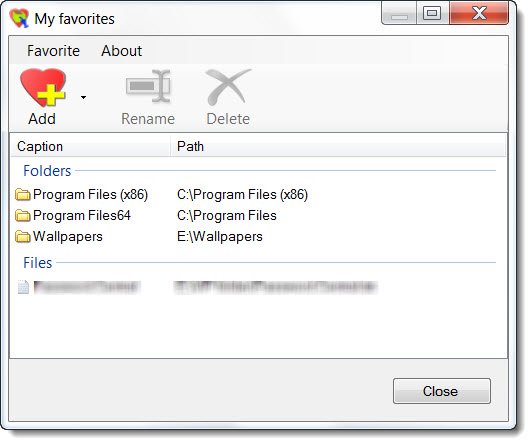
confavor 2 400x334 Access favorite folders and files quickly from context menu with ConFavor

ConFavor too grants you quick access to all your favorite folders, programs and other files from the right-click context menu. You no longer need to navigate the explorer folder structure to access you oft-used folders and files.

It is a shell extension for Windows Explorer. It displays shortcuts to your favorite folders and files in a single menu. The easy access to the favorite menu is possible from Desktop context, Folder tree browser, File browser and the Open / Save as dialogue boxes.

This small tool will simplify considerably file management on your Windows by making access easier and quicker.
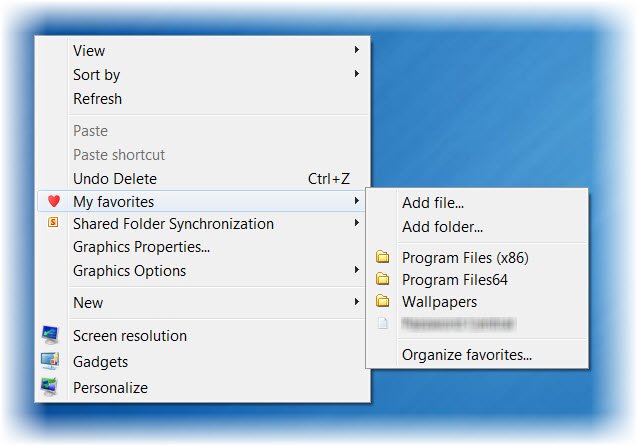
confavor 1 600x419 Access favorite folders and files quickly from context menu with ConFavor

The ConFavor Free version lets you add and manage up to 10 favorites, which should be good enough for most of us.

Posted by on , in Category Downloads with Tags
Anand aka HappyAndyK is an end-user Windows enthusiast, a Microsoft MVP in Windows Desktop Experience since 2007, and the Admin of TheWindowsClub.com, TheGeeksClub.com & WinVistaClub.com. Creating a System Restore Point before trying out a new software or a tweak is always recommended.
  • http://trm96network.org trm96

    Cool idea, but I like to keep my contextual menu as tidy as possible.

  • japp

    Good find

  • sut

    Folder Menu allows you to add unlimited folders/folder structures and the menu appears with a middle-click rather than a right-click. Priceless! here’s the link
    http://foldermenu.sourceforge.net/

  • curiouso9

    Folder Menu? yea.. im using it now. accessible using middle click. neat and nifty. open source too.

  • TheNetAvenger

    Ok, interesting tool, but what advantage does this offer over just pinning the Folders to the Explorer Icon on the TaskBar?

    (Click and drag any folder to Windows Explorer icon)

    Especially since the TaskBar is visible more often than the desktop.

    Just curious…