
One cannot and should not simply physically remove a USB drive, lest you lose unsaved data, but use the Safely Remove Hardware option offered by Windows. But this involves a couple of clicks. USB Disk Ejector is a program that allows you to remove USB devices in Windows quickly.
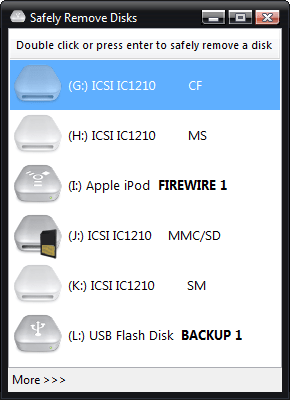
USB Disk Ejector lets you quickly remove USB devices
This free software was originally designed to remove only USB pen drives but will now eject any USB or firewire device that Windows sees as a disk. It can also eject flashcards from card readers.
It can be run as a non-visual command line program or a normal GUI program and is very useful if you have a USB flash/pen drive, especially if you use a menu such as PStart or the Portable Apps launcher.
The command-line options are very flexible; they can be used to:
- Eject the drive that the program is running from.
- Eject a drive by specifying a mount point.
- Eject a drive by specifying a drive letter.
- Eject a drive by specifying a drive name.
- Eject a drive by specifying a partial drive name.
The tool can detect and auto-close any applications running from the disk before ejecting.
You can download it from its home page.

